 EN
EN  DE
DE


AI Summary
- Standard Operating Procedures (SOPs) document day-to-day processes so they are repeatable, accessible, and executable by employees or customers rather than residing in one person’s head.
- SOPs may use documents, checklists, diagrams, flowcharts, infographics, or wikis. They identify a task’s purpose, timing, responsible person, terms, concerns, and sequential procedures.
- Effective creation includes defining scope, gathering information, choosing a format, drafting, stakeholder review, publishing, promotion, review and amendment, and analyzing usage metrics.
- SOPs support best practices, scalability, employee onboarding, compliance, communication, and reduced errors. Organizations should continually document and improve processes across departments.
- Adoption challenges include outdated documents, employee non-involvement, missing feedback, and difficult consumption. Document360 provides features including access rights, analytics, notifications, article versioning, review reminders, category management, and separate editor and reader interfaces.
AI-generated content. It may contain errors.
See Document360 in action
What is Standard Operating Procedure?
Standard Operating Procedures or SOPs are a fancy way of documenting your day-to-day processes to make them repeatable. Within your organization, you would have called it by different terms, such as Process documents, Blueprints, Business Playbooks, Training Manuals, Employee Handbook, and User guides.
But at the end of the day, it all boils down to the same problem: educating your employees or customers about a certain process.
Standard operating procedures will be in place throughout your organization, whether you are small or large. The larger the organization, the more SOPs will increase. It is good practice to bring the culture into the organization to document your routine tasks so that knowledge is not residing in someone’s head and is available for anyone to execute.
Types of Standard Operating Procedures
Standard operating procedures can take multiple forms; it comes down to common sense and how that process is represented. Certain SOPs can be in a simple documentation format (online, Word, PDF), some could be in the form of Checklists, and some could be in the form of diagrams and flowcharts.
The result is how we can educate users in the shortest possible time to make them perform that activity reliably and consistently.
As author Michael Gerber famously wrote in the book E-Myth
“You need to be working on your business, not in your business.”
Standard Operating Procedures are investments
The amount of time we spend on producing SOPs might look overwhelming at the beginning, but over the period, you’ll start seeing the benefits.
It’s always easy to just carry on performing the activities without documenting them or educating someone else to do them. Especially founders’ and senior managers’ thought processes will be something down the line of
- “I know better than anyone else that no one can perform this task.”
- “I can quickly perform this activity within 10-15 minutes rather than spending 2 to 4 hours documenting/explaining the process to someone.”
- “I wouldn’t ask my people to do anything that I wouldn’t do.”
If you want to scale your business and turn it into a process-oriented organization, you need to move beyond the thought process above.
Any complicated tasks need to be split into smaller tasks so they can be performed by anyone without knowing too many dependent systems. The tasks that might look small in 10-15 minutes will all quickly add up and eat your day.
Example: the real cost of a 15-minute task will be over 45 minutes, including time allocation on both sides of the task and the cost of context switching. Soon you’ll be bombarded with too many such 10-15-minute tasks.
It’s always better to create the SOP, train, and empower your team and then to step back.
SOPs first identify and summarize a task, describe its purpose, and specify when and by whom it is to be performed while simultaneously defining uncommon or specialized terms and addressing potential concerns (e.g., necessary equipment, health, safety, etc.).
They then describe the sequential procedures to be followed, often using activity checklists and graphic illustrations (e.g., charts, tables, photographs, diagrams) to ensure the procedures are performed accurately and in order.
Bring SOPs as Organizational culture
Any business should build a culture of running the business in a more systematic, process-driven way, regardless of its size. The sooner you bring this culture into your organization, the sooner your business will get streamlined and scale.
It’s easier said than done, but you can take baby steps and gradually improve the culture of constantly transforming the activities into processes.
Imagine every quarter you pick up a set of repeated activities you want to document and convert into Standard Operating Procedures. Bring this culture across all of your departments: Admin Operations, Recruitment, Marketing, Sales, Customer Success, and Engineering.
Let’s imagine you don’t have any SOPs. This could be your first quarter initiative. Just start with 2-3 SOPs for each department and make it a cultural practice in the organization to continuously review what activities people are doing in each department and document them.
Admin & Operations
- SOP – Leave approval process
- SOP – Vacation policy
Recruitment
- SOP – How to use LinkedIn Recruiter
- SOP – Initial screening call procedure
Marketing
- SOP – How to publish a new blog
- SOP – Checklist for social media banner images
Sales
- SOP – How to qualify the inbound lead
- SOP – How to handle pricing objection
Engineering
- SOP – How do you request a code review?
- SOP – How to resolve merge conflicts?
Customer Success
- SOP – Standard set of questions for the first customer success call
- SOP – How to segment customers for customer success calls
Accounts / Licensing
- SOP – How to refund payment in Stripe
- SOP – How to follow up on unpaid invoices
Most of these SOP documents shouldn’t take more than a few hours to a few days. But once done, you can imagine the structure and power it can give in the long run.
You can use dedicated SOP software like Document360 (or even Google Docs) to get started easily.
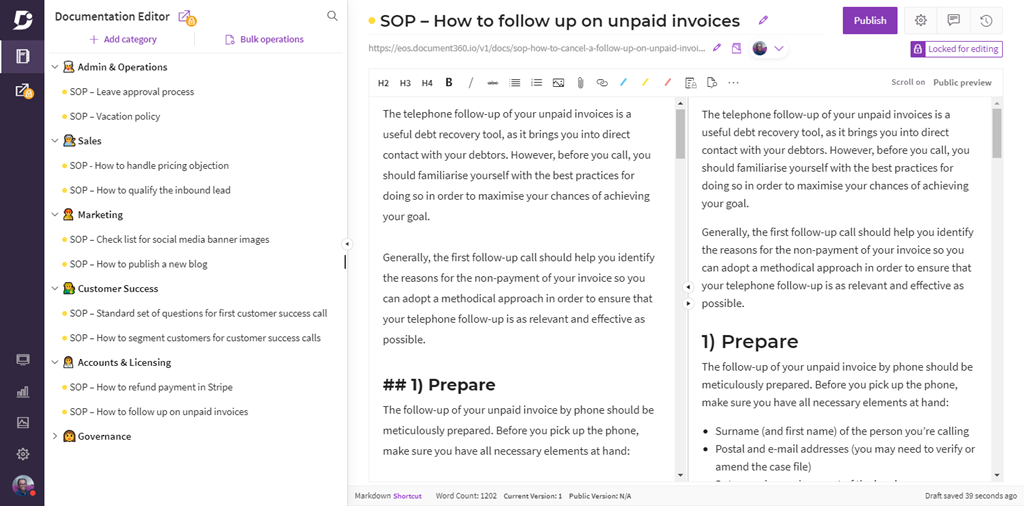
Here is a screenshot for your reference:
How to write an effective Standard Operating Procedure (SOP)
There is no official standard for writing an SOP. But there are some steps you can follow to help you organize your thoughts and plan the most effective path to standardizing your procedures.
1. Define the scope
Before starting any SOP, clearly define its scope. Your SOP must solve a specific problem and be easy to understand. Example: “Employee onboarding.” The scope of this document is very clear from the title. The document should cover only the essential details of this title.
2. Gather information
Once the scope is defined, gather as much information as possible. Most of the time, a Standard Operating Procedure document is created to streamline existing work. So you’ll know exactly how that’s done currently, once you have all the data, it’s easy to put it together in a structured format.
3. Choose the format
Decide the best possible format for the topic. The majority of cases will be documented either in the document or as a Checklist.
4. Complete the draft
At this stage, you are good to complete the first draft of the SOP.
5. Review with stakeholders
It’s important to get buy-in from all stakeholders involved in that specific SOP. If we take the same example, “Employee onboarding,” you might have a few departments and people involved in that process: your Recruitment team, HR team, IT assets team, and Facilities team.
Everyone should clearly understand the document and provide their feedback. You can use the “Discussion” feature to get reviews and respond to them on the Standard Operating Procedure.
6. Publish
Once you have approval from all stakeholders associated with the specific SOP document, you can publish it in a centralized internal knowledge base accessible to everyone.
7. Promote
Sometimes it’s not enough to just create and store the SOP document in a central repository; you need to actively promote it to all stakeholders. One of the biggest challenges with SOP is that SOP documents are often overlooked and lose their original purpose.
You need a mechanism to ensure it’s used consistently. The “Notification” feature can be used for this purpose, both for initial publishing and for continuous notifications to users about amendments and new versions.
8. Review and Amend
This is pretty standard. Most organizations don’t look back at their processes after defining them, having a “don’t fix what’s not broken” attitude. More often than not, though, there are many benefits to improving the process. Document360 includes a few built-in features to address “Article Versioning” and “Review Reminders.”
9. Analyze usage metrics
First, you need to define the right metrics. You can’t improve something you can’t measure. You need to constantly check the adaptation of the published SOP documents. Imagine spending so much effort producing an SOP document, only to have it go unused after 3 or 6 months; it’s a waste of effort.
Analytics features help to see key metrics like how many visits, leading SOP articles, search terms used to find SOPs, Feedback comments, etc
Interested in exploring how Document360 can streamline your SOP management? Schedule a demo with our experts today!
Book A Demo
Formats of Standard Operating Procedures
All SOPs share the systematization of the individual steps performed in implementing a repetitive task to create an overall quality system. There is no one-size-fits-all. Similarly, no one tool fits all.
The end goal of Standard Operating Procedures is to ensure end-users understand the procedures well enough to perform their activities. Try to use the tools you already have and complement them with others that will achieve the goal.
Let’s take a look at some of the formats of Standard Operating Procedures
User Documents
Standard Operating Procedures are typically documented. This will be more educational, helping employees and users understand a process in a systematic, repeatable way.
Examples: How to perform code review, How to set up a new vendor in the banking system, Employee onboarding, and exit procedures. For this scenario, you can use either Knowledge base, Google Docs, or Microsoft Word (along with SharePoint, Microsoft Teams, and Confluence).
Check Lists (Business Process Automation)
This is one of the common forms of SOPs. In most cases, a procedure has a predefined set of activities that must be performed in sequence.
Examples: Blog publishing, pushing a new release into production, QA final sign-off process, and so on. For this scenario, you need to use some Business Process Automation (BPA) tools like Kissflow, Tallyfy, Process.st, etc
Infographics
This is similar to user documents, but some processes are better explained with powerful graphics to help users understand. Here is a great example: How not to look ugly on a webcam. You could have put these steps either in a document or a checklist, but creating infographics makes them more powerful and engaging for users. There are various infographics-creating tools like Canva, Piktochart, Venngage
Diagrams/Flowcharts
In some cases, the standard operating procedures will be a logical sequence of steps that can be better represented as flowcharts or diagrams. Example: How to escalate a problem, Lead flow from signup to sales. Tools to create flow charts /diagrams: Lucidchart, Creatly, Whimsical
Wiki/Collaboration
In certain cases, where many people regularly update the standard operating procedures, an Internal Wiki or a Collaboration tool will be ideal.
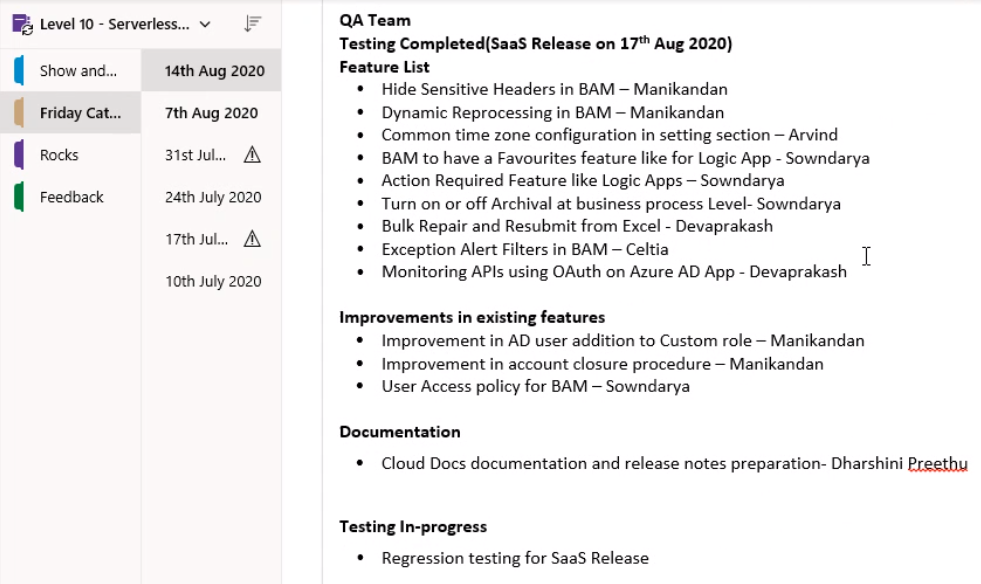
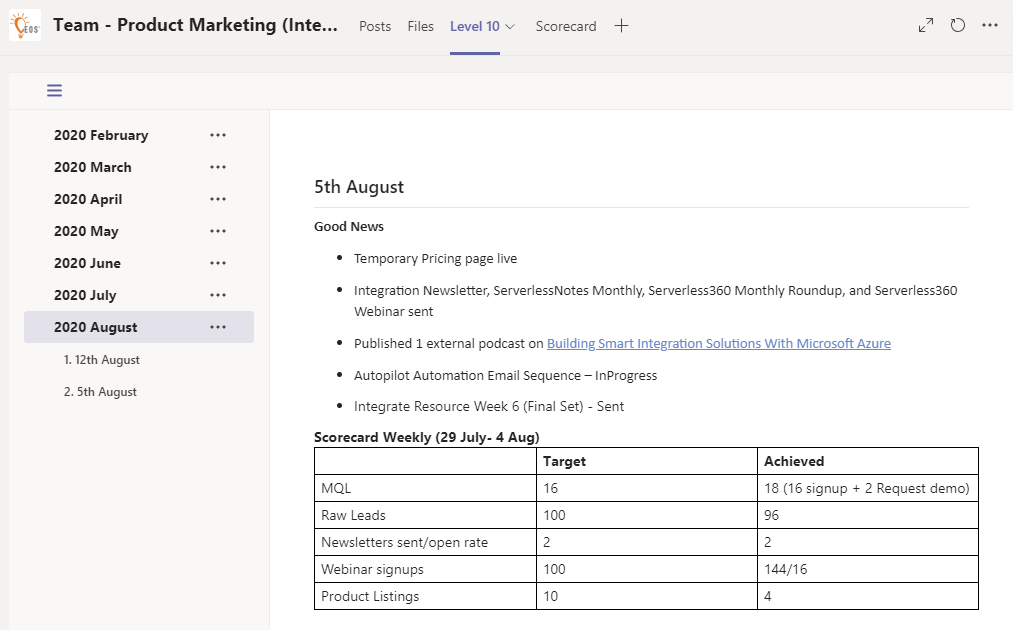
Example: Daily/weekly agile stand-up meetings, Team meetings, etc. In our case, we use Microsoft OneNote for daily/weekly engineering team meetings, where all the developers and testers update their progress. And for one-to-one meetings, we follow the Level 10 format from Traction, with a standard structure across the company, maintained in a Microsoft Teams Wiki. You can also use modern tools like Notion and Coda
Structure, Template, and Categorization of an SOP document
SOP Structure
The standard operating procedures, on their own, should include a standard operating procedure for how each document will be structured.
- Title
- Article Metadata
- Executive summary
- Glossary terms
- Table of Content
- Main Content
SOP Template
Having a well-defined structure (SOP Template) for your standard operating procedures brings consistency across all your documents. The above points are just for your guidelines, and you can tweak them according to your company fit. Here is an example.
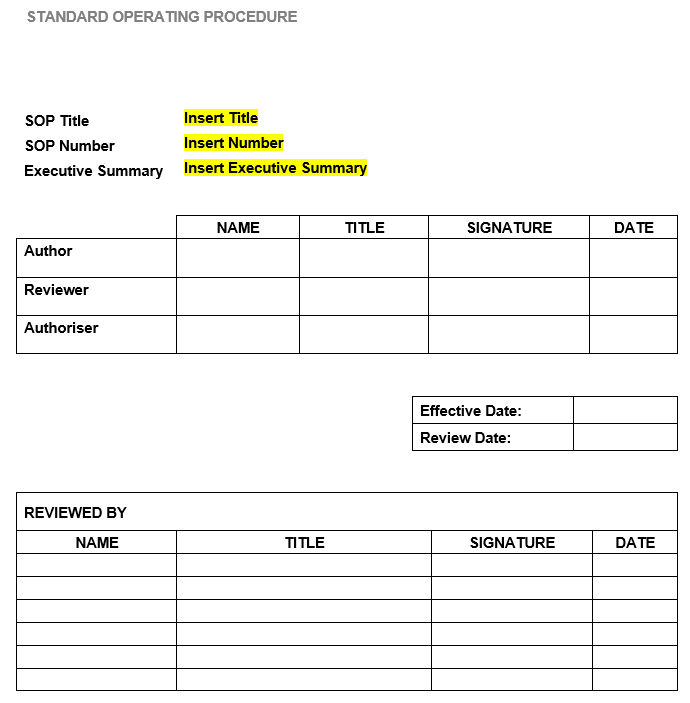
A single-sourcing feature can be used to define this standard repeatable feature in every SOP document.
Categorization
Over time, as your company matures and processes and SOPs proliferate, you’ll start to face a new problem: how to group, structure, and organize them in a well-defined way so people can find and use them easily.
What’s the point of writing an SOP document if no one can find it or use it? Put a plan in place on how you want to create an organization-level or department-level (if you are big) category structure in place to organize your SOPs
We can help you achieve this through features such as organizing multiple projects and maintaining a clear folder structure and hierarchy using the category manager.
Benefits of Standard Operating Procedures (SOP)
SOPs can also provide many benefits, such as minimizing the chance of miscommunication, affording comparability, and ensuring regulatory compliance. Here is the list of tangible benefits of having well-structured SOPs
- Enforcing best practices
- Making processes scalable
- Onboarding employees
- Ensuring regulatory and standards compliance
- Preventing process failures
- Reducing errors and corrective actions
- Improving communication (with SOPs, everyone is on the same page)
If you are looking at a long-term view, as a business owner, you might want to sell your company at some point. Just like your client list and products, your Standard Operating Procedures can add value to your company. Well-documented routines that are being used send a positive message to the future owner that your company is organized and can run without you.
Also Read: 10 Benefits of Creating SOP for Your Call Center
Example scenarios
To better understand why SOPs are required in an organization, let’s take a couple of real-world examples from our own experience.
Example 1: Recruitment and Hiring Process (Organization level)
When we were smaller, we didn’t have a dedicated recruitment team, onboarding team, HR department, or IT department. Pretty much all hiring and onboarding tasks were handled by either the founder (me) or one or two senior people in the organization.
Today, we have close to 130 employees, and with all the above-mentioned departments in place, about 8 people are involved in bringing on a new employee.
This is where standard operating procedures (SOPs) become crucial to make the process seamless, giving clear guidelines on each and every one’s responsibilities, making it repeatable, and reducing dependencies on any individual.
The way we do it at Kovai.co (parent company of Document360) is by clearly defining the SOPs. As I mentioned earlier, Standard Operating Procedures can be represented in various formats.
In our case, it’s a combination of Microsoft Teams, with various channels, and policy and procedure manual documents in Document360, along with flowcharts (from LucidCharts).
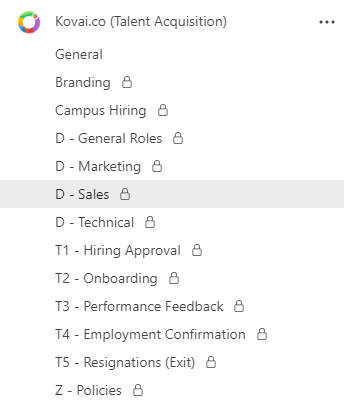
As you can see from the above picture, for every step in the recruitment process, right from finding talent to the exit of the employee, it’s well structured. There is a different Microsoft Channel to list the roles (with a D prefix) for each department.
Once hired, we have a set of Standard Operating procedures like an approval process, onboarding process (email creation, laptop allocation, etc), performance feedback after 3-6 months probation, employment confirmation, and if someone resigns, the exit process (represented with T prefix).
The only way to scale a business is to clearly define your standard operating procedures and continually tweak and improve them as your organization grows.
Example 2: Customer Success Routines
At Kovai.co, we have dedicated customer success teams for each of our products. Their primary job is to book appointments with existing customers and to have periodic calls every 3-6 months to understand product usage, gather feedback, and pass it on to the engineering team.
We have a well-defined process and standard operating procedure for this activity.
Here is a real sample from an existing internal SOP project:
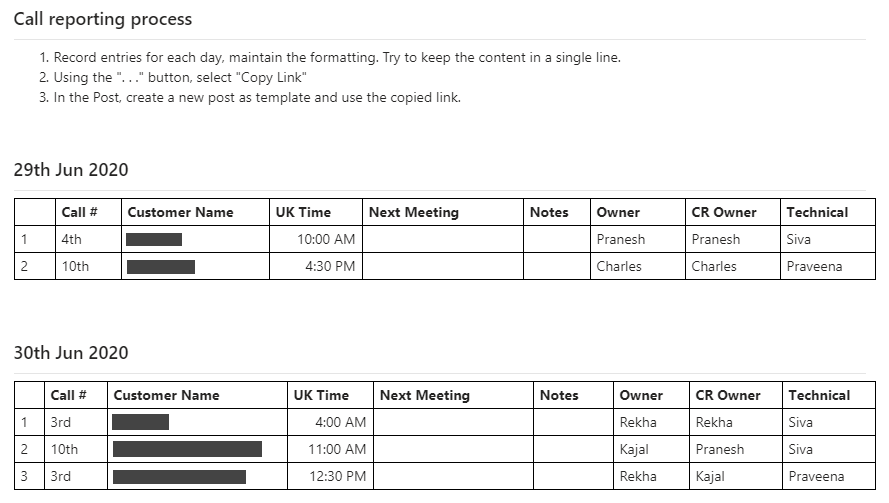
As you can see, the instructions are clearly defined to detail “try to keep the content in a single line” and “UK Time”, so if we bring someone new to the team, it will take a few hours to 1 or 2 days to get up to speed on the process.
Without these SOPs, the team won’t be coordinated, and they will all record in whatever way they think is appropriate. Again, this process evolved inside the company over time.
Challenges in adopting the Standard Operating Procedure (SOP)
As I mentioned earlier in the document, bringing SOPs into the organization is a significant investment and a cultural change that must be addressed systematically for successful implementation.
Some of the common challenges you’ll experience adaption SOPs
- Outdated SOP’s
- Non-involvement of employees
- Missing Feedback loop
- Easy to consume
Outdated SOP’s
SOP documents are living documents. It’s not typically done and dusted (in most cases). Hence, it will require constant updates to keep it up to date. An outdated document is a useless document.
If SOPs do not reflecting the current working process (even a slight deviation) then it become useless. You can easily address this problem by using the Review Reminder feature, set a reminder once the article is published to make it stale after a period. Example: 3 months, 6 months, etc. You can then review, amend, and republish it.

Non-involvement of employees
This is another major challenge: if nobody uses the published SOP, it’s pretty much useless. You need a process to constantly review SOP metrics and usage, and to implement some push (e.g., highlighting it in meetings, taking it to senior management to get it moving, etc.).
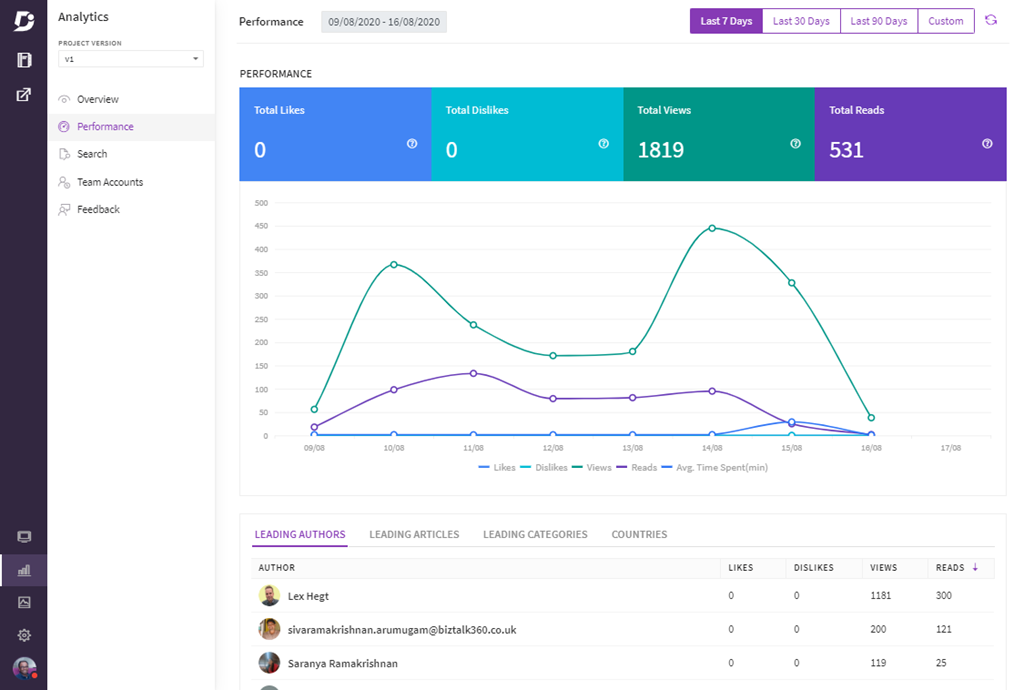
The Analytics will help you get metrics on views, reads, popular articles, likes, dislikes, etc.
Missing Feedback
You need to get people (employees) involved to mature your standard operating procedures. If left in the silo, then you cannot identify the real challenges in the process.
A good SOP tool can help you solve this problem by giving readers (not stakeholders/reviewers) options to provide feedback on SOPs, such as whether they like/dislike them, or to leave explicit comments on specific sections of the article.
Hard to consume
The simpler you keep it, the more likely you are to get adopted.
We offer two different interfaces: a Knowledgebase management portal for people who write/manage standard operating procedures, and a simple Knowledgebase site focused on readers with great search, category visualization, and feedback options.
Why Document360 for Standard Operating Procedures?
Even though you can use standard tools like Google Docs or a bunch of Microsoft Word documents stored in a central shared location, using Document360 will make your life easier and remove many of the pain points I addressed throughout the document.
Let me highlight a couple of challenges with examples:
You might want to restrict a specific category of SOPs to a select group of people (E.g., the HR team has sensitive SOP documents). You can easily do this using our category-level access rights via security groups and reader accounts. Even though you can do this with Google Docs and Microsoft SharePoint, it becomes a bit more tedious to manage it.
Separate interfaces for Editors and Readers. Editors will require a bit of sophistication when creating SOPs, such as a rich editor, analytics, and a category manager, whereas Readers only need a good interface to read content on any device with real-time search.


