 EN
EN  PT-BR
PT-BR FR
FR ES
ES DE
DE


Are you wondering how to manage documentation for your multiple products efficiently? Looking for best practices for multi-product documentation?
Having unified and standardized documentation across products in your business is critical.
Product documentation that shares a common look and voice enhances customer experience by minimizing friction when the customer goes from one product to another. A consistent structure in documentation across products allows indexing and clear navigation, helping customers to find the right information quickly, thereby enhancing customer satisfaction.
Unified documentation also allows writers to reuse common content such as setup steps, definitions, or shared integration instructions. This eliminates a lot of repetitive work for technical writers. Centralized systems of documentation make it easier to create, manage, and share content. This helps documentation teams work faster, produce more, and maintain accuracy in information across products.
So, in this article, I will get into detail about creating a multi-product documentation strategy that ensures that all users, including your developers, customers, and internal teams, get reliable and up-to-date content.
Let’s get started.
📝 TL;DR:
Multi-product documentation fails when content lives in silos and a fragmented information architecture; centralization and consistency fix it.
- Without a central documentation platform, teams lose time searching and duplicating work, and create fragmented user experiences.
- A central knowledge base lets teams reuse common content while maintaining tone, structure, and accuracy through shared templates and style guides.
- Dedicated workspaces enable product-specific document customization while preventing chaos.
- Version control and collaborative workflows ensure documentation stays up to date and relevant.
Why Multi-Product Documentation Needs a Strategy
Managing multiple product documentation comes with its unique challenges.
So, while improved product adoption and retention, enhanced customer satisfaction, and easier employee onboarding remain some of the core goals of your documentation strategy, you must see how this pans out consistently across all products’ documents.
To do this effectively, you need a multi-product documentation strategy. There can be many repercussions if you don’t have one, and among multiple challenges, you will:
- Suffer reduced productivity as employees will waste time searching for information among inconsistent resources, and even end up not knowing where to look.
- Face developer frustration as they will have no clear guidance to go ahead, leading to errors and potential customers leaving your business.
- Incur higher support costs as a lack of proper documentation across products will result in a higher number of support tickets.
Before we learn how to create the strategy, let us first see what the core challenges are that we need to address with it.
Core Challenges in Multi-Product Documentation
As your product portfolio grows, the documentation behind those products becomes harder to manage. The existing systems aren’t enough anymore because not only is there way more content, but the way teams work, store information, and update content needs a complete overhaul and restructuring focused towards cohesive working.
In the absence of such a system, teams will keep duplicating work, create information silos, and product knowledge will be scattered across disconnected systems.
You are no longer catering to a simple mix of beginners and advanced users for the same product, but to a diverse audience, from developers to completely non-technical users to internal teams. This demands highly adaptable, well-structured content that remains relevant at all times.
Maintaining consistency becomes a significant challenge as products evolve at different speeds, with overlaps, and content can start to sound out of sync.
Let us further understand these core challenges in detail so we have the full context for why we must follow a particular strategy or best practices.
Avoiding duplication and information silos
Your business may grow organically from a single product to multiple products, but your product teams do not evolve to meet this challenge on their own. Different product teams continue to operate independently as standalone units, hoarding data instead of sharing it, creating information silos.
Information flow is minimized, and there is duplication of work due to a lack of collaboration, resulting in wasted hours and compromised productivity.
Function-specific software solutions, such as CRMs used by teams separately, do not integrate well with each other, thereby deepening the issue.
Fragmented information architecture across different product lines
As different product teams still work as separate units, product information and navigation end up scattered across many disconnected systems. This results in a fragmented information architecture and operational inefficiencies.
A lack of unified data governance results in data being stored without any standard formats, naming conventions, and other data quality standards, rendering it almost impossible to find relevant data when required.
It also results in a sub-optimal user experience as users get lost and frustrated with different information and layouts between products from the same business.
Cross-product dependencies
Users expect a smooth experience when navigating documentation for connected products, but creating a structure that helps them easily find the right information without repeating content is challenging.
Cross-product dependencies make this even harder. If one team delays its documentation updates, related content for other products becomes outdated without them even realizing it.
It’s also often unclear which team is responsible for documenting shared features, leading to a lack of ownership and further delays in updating documentation.
Maintaining consistency across content
When multiple products share features, they must maintain consistent style, tone, and terminology across documents to ensure a seamless user experience. But this becomes nearly impossible when teams use disconnected tools such as separate content management systems for each product.
Also, products evolve at different speeds, and their documentation quickly becomes misaligned, leading to conflicting and outdated information.
Last but not least, the volume of content in a multi-product company makes manual consistency checks extremely difficult and error-prone.
Managing diverse product audiences
Managing a diverse product audience is another challenge in multi-product documentation, as your audience includes everyone from beginners to expert developers, support teams, and specialty teams such as marketing and sales. All of them need the same core information, but it is presented at different levels of detail.
Providing this kind of personalized and dynamic content requires advanced content management systems.
Additionally, you may need to translate your documentation for a global audience or make it accessible to people with disabilities, which adds complexity.
Handling version control and updates
Version control can be a significant challenge when products release new versions quickly and at different intervals.
It’s hard to keep documentation updated, and when the documents don’t match the product, users get confused, resulting in an overload of support requests.
Now, let’s discuss best practices to help you successfully address these challenges in multi-product documentation.
Best Practices for Creating Multi-Product Documentation
Now that the core challenges of multi-product documentation are clear, the next step is to devise a strategy to implement best practices that address them.
Adopting the right tools and putting the right systems in place play a major part in it. The key is to build a documentation workflow and structure that supports collaboration, minimizes duplication, and keeps content consistent. Workflows for every product should be established so issues don’t accumulate and you can scale smoothly as your product portfolio grows.
The best practices below focus on exactly that – centralizing knowledge, giving each product its own space, reusing content wherever possible, setting up content standards, efficient version control, and delivering a branded documentation experience.
Let us get into the details of each of them.
Centralized knowledge management system
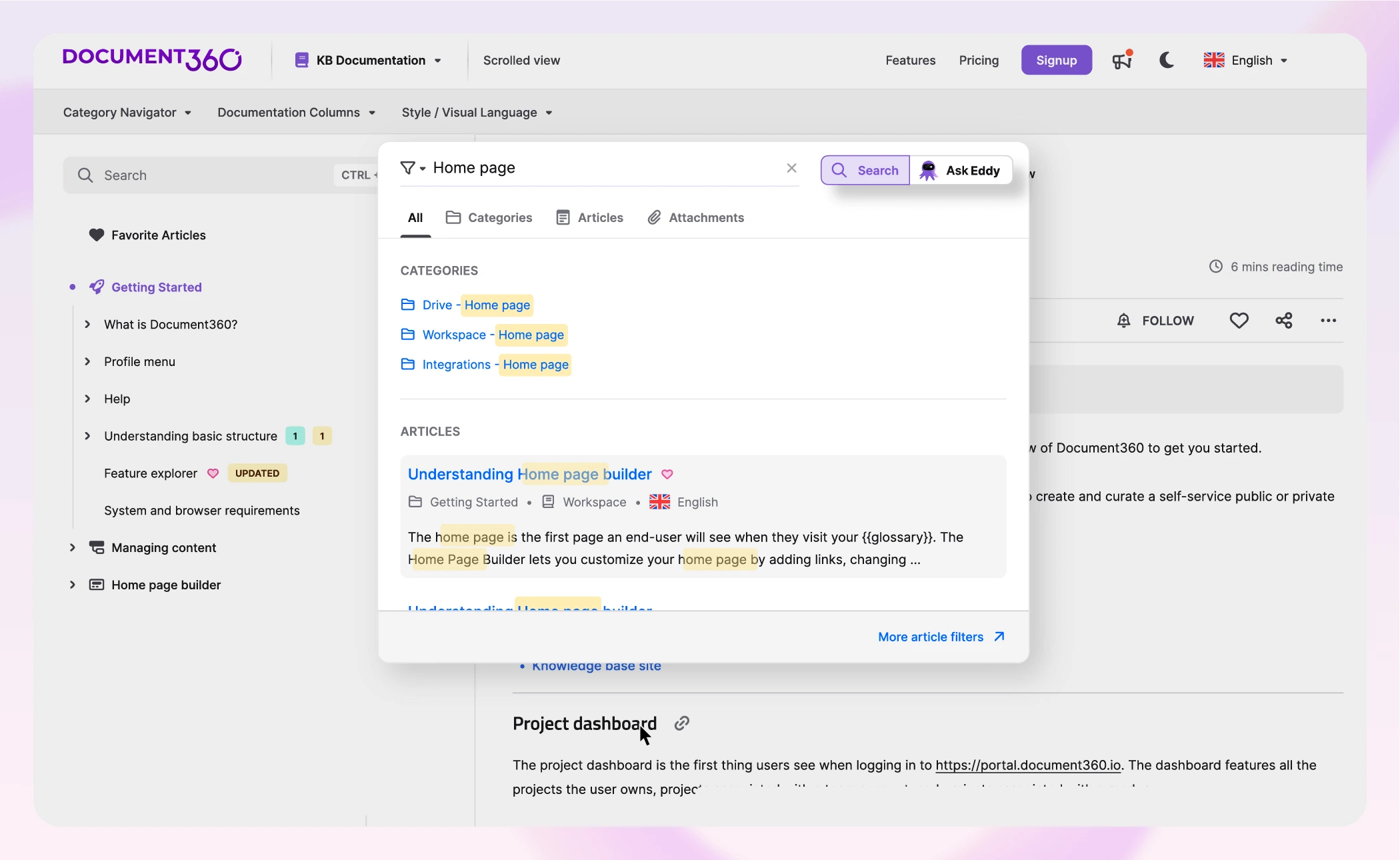
When we look closely at each of the challenges discussed before, the need for a centralized data storage, knowledge management, and sharing system comes to the forefront.
A dynamic knowledge base software, such as Document360, provides you exactly that.
With Document360, you can build a knowledge base and provide a centralized platform for all your teams, breaking down information silos across all products. Each product team can publish a brand-aligned knowledge base tailored to their specific product.
Information flows smoothly across the organization, and team productivity increases as they collaborate on everything from creating and managing to sharing product information.
Dedicated project spaces for each product
Different product teams must be able to collaborate on one platform, but it is also important for them to have a dedicated space for their product for multiple reasons.
A good knowledge base can help you do this by providing each product with its own organized space. For instance, with Document360, you can create separate ‘projects’ that serve as a comprehensive container for specific documentation needs, such as API documentation, software documentation, and internal documentation.
Since each product may have a different audience, these dedicated spaces allow writers to customize the tone and format of content accordingly. This makes content easier to create, easier to navigate, and more consistent.
Shared content and templates
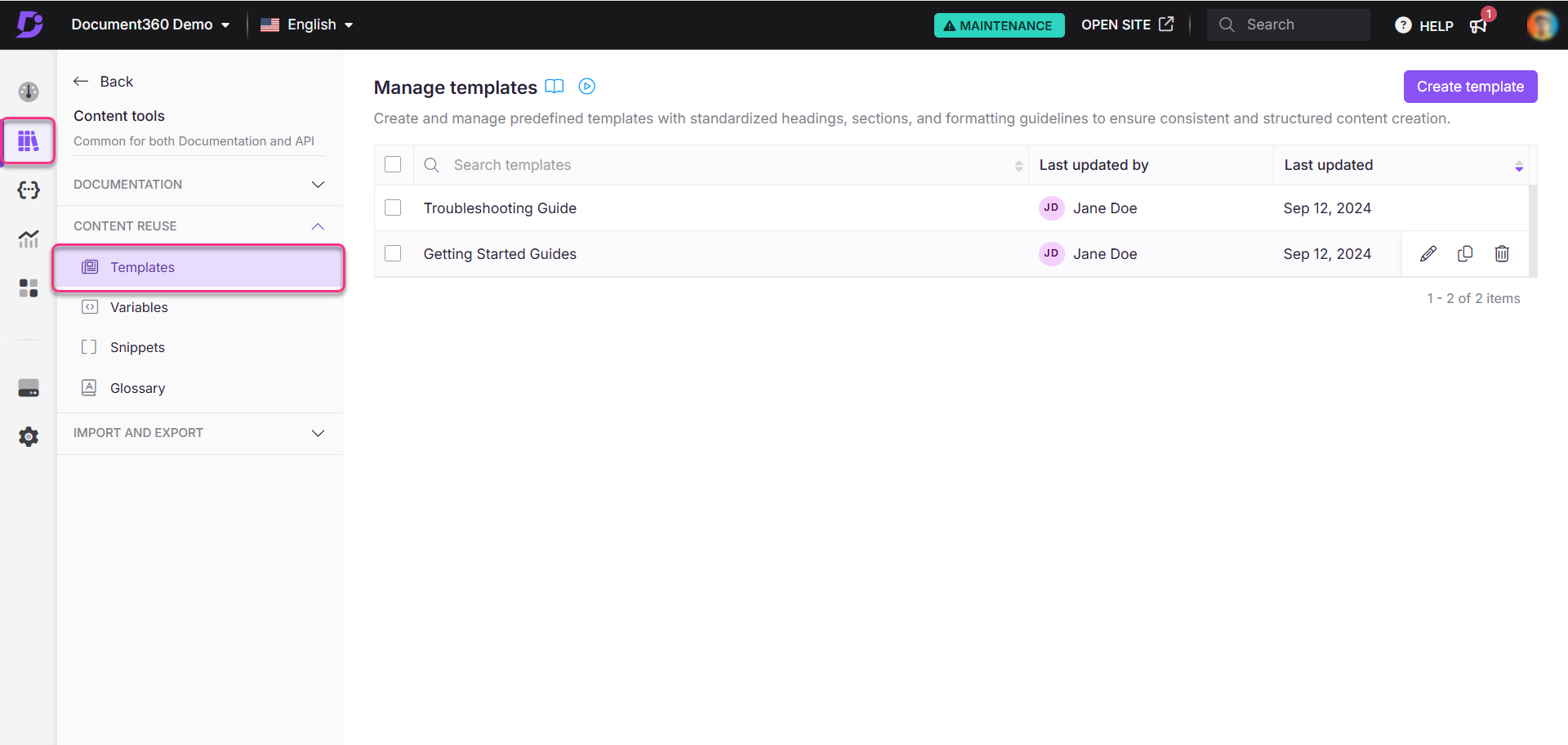
Just as there can be particular content needs between products, there are also everyday content needs and templates, such as installation setup, troubleshooting steps, code snippets, FAQs, and more.
The best way to avoid duplication and repetition in this work is by breaking down content into reusable components or “content blocks“, which then can be used as and when needed for different products. A knowledge base provides this functionality.
For instance, an explanation for a shared feature, such as “how to reset a password,” can be written once and applied everywhere. And whenever an update is required, it only needs to be done in one location, and documents across products get updated automatically.
Consistent documentation style guide
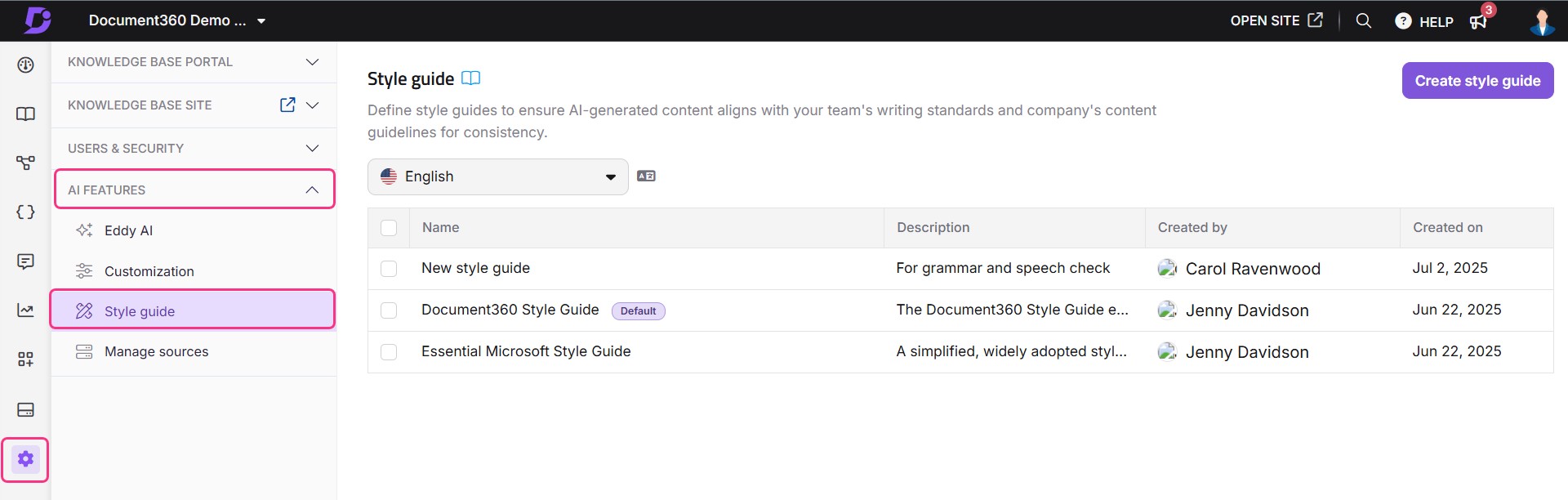
Consistency is key to optimal user experience in a multi-product environment. Whether they share features or not, uniformity in style, tone, and terminology is important so that brand identity is maintained and users are not frustrated.
To achieve this, you must have a style guide that lays down rules on how your documentation should sound, including tone, voice, and preferred terminologies.
A knowledge base helps you implement a style guide effectively, turning it from a static, forgotten document into a dynamic resource that is easily accessible and consistently applied.
Version control and workflow management

Keeping the documentation updated while ensuring that the correct version is available to all parties in a multi-product setup is essential.
A knowledge base makes this feasible, so that multiple users can work on the same document simultaneously. Users can fork the preferred version of a document for publishing and also create a new version for editing. Each version is given a specific name so users can easily identify it.
Workflow management is also crucial in multi-product documentation as it involves many teams contributing to the documentation, and in the absence of a clear process for it, things will go haywire.
With a knowledge management software, you can create a clear workflow for all documentation by creating a single place to manage the work and defining who does what. This also keeps all stakeholders aligned with the process, its progress, and deadlines.
Customizable, branded documentation hubs
Customizing the appearance and functionality of your knowledge base is crucial so your users have a seamless experience. It is best that your knowledge base site design aligns with your brand identity, including colors, logos, typography, and more.
With Document360, each product can have a customized knowledge base. You can adjust everything from themes, colors, and layouts to make your knowledge base visually appealing, user-friendly, and accessible.
Build a scalable multi-product documentation system with a centralized, structured, and consistent knowledge base. Explore how Document360 can help.
Get Started
Common Mistakes to Avoid
In addition to following the best practices in multi-product documentation, you must also avoid some common mistakes that can lead to productivity issues and sub-standard documentation.
Treating all product documentation the same
While consistency in brand voice is important, ignoring the unique needs of different products and customers is a mistake. You cannot maintain the same approach to a document when creating it for a developer and an end user.
A one-size-fits-all approach to documentation leads to irrelevant and ineffective content, and document creation must always be customized to its specific goals and audiences.
Lack of governance and ownership
While accessibility and collaboration are pivotal, ownership and governance throughout a document lifecycle are important.
If there’s no ownership and accountability, tasks can fall through cracks, workflows are blocked, and there are increased errors and compliance risks. Without governance, there is no single source of truth, resulting in compromised standards and consistency.
Overcomplicating structure and navigation
Especially in a multi-product setup, it is crucial to keep the content structure and navigation as simple as possible.
When users are already dealing with multiple products, a complicated navigation confuses them further, leading to frustration and delay in finding solutions.
You must keep the structure and navigation as simple as possible by using:
- Standard layouts
- Categories and sub-categories up to a certain depth
- Simpler naming conventions and
- Dedicated product documentation spaces
Also, always build with search in mind and keep improving your structure and navigation with user feedback.
Centralized vs Distributed Documentation: Which Model Works Best?
Before you get started with implementing the above best practices, you must give ample thought to the kind of documentation architecture you want to build as a whole – centralized, distributed, or a mix of both.
It is not about a specific tool or system; it is about how you want to organize your multi-product documentation at a conceptual level to serve your business best. Here are three different scenarios to understand this better:
- You are a SaaS business offering a suite of related productivity tools – Calendar, Tasks, Notes, etc. All your documentation, from product guides to FAQs, and onboarding is stored there.
- You are a tech company offering unrelated products – an email marketing tool, a helpdesk system, and a CRM. You decide to go for separate knowledge bases for each of these products. Each product team works independently, and there’s product and audience-specific documentation in each knowledge base.
- You are a business like HubSpot, with multiple products: a Marketing Hub, a Sales Hub, and a Service Hub. So, you decide to adopt a centralized knowledge base but still create isolated spaces for different products within it.
In a nutshell:
- Centralized Information Architecture suits best for a tightly knit set of products where most features and user journeys overlap.
- Distributed Information Architecture suits best for companies with a diverse set of unrelated products.
- Hybrid Information Architecture suits best for businesses with multiple products where some features overlap, but each product has its unique function and audience.
So, for different business types, different information architectures work best; leaning towards a hybrid model is the popular choice, as it makes scaling up and expansion easier.
Conclusion
Managing documentation across multiple products is only chaotic if your documentation is scattered. A centralized knowledge base can help you bring all your product documentation under one roof while giving each product its own space.
It also helps you standardize the documents and create a cohesive experience for all stakeholders, including writers, developers, and customers. The goal is to create a setup where teams can collaborate smoothly, and users have a seamless experience finding what they are looking for.
With the right tools and best practices, consistency is achievable, and your documentation can finally work as a unified whole.




 –
–