EN
EN  PT-BR
PT-BR FR
FR ES
ES DE
DE


AI Summary
- Self-service is customers’ first destination: 73% attempt it, but only 14% fully resolve issues in company help content. The gap is primarily a platform problem.
- Modern documentation serves user, developer and API, and internal audiences. Platforms must support AI writing and search, release-based version control, multi-language workflows, integrations, behavioral analytics, and publishing without engineering dependency.
- Documentation supports activation, recurring revenue, SEO, and AI systems. It must be clean, current, machine-readable, and usable by chatbots, in-product assistants, and agent copilots.
- Platform fit depends on audience, product-change frequency, localization needs, integrations, and company stage. Early-stage teams prioritize speed and cost; growth-stage teams need multilingual, versioned, permissioned content; scale-stage teams need governance, SSO, audit trails, and SOC2 compliance.
- Document360 provides Eddy AI, version control by release, multi-portal architecture, localization workflows, integrations, analytics, and publishing without engineering.
AI-generated content. It may contain errors.
See Document360 in action
📝 TL;DR
Most companies have a self-service channel. Only one in seven customers actually gets an answer from it. The gap is rarely the content. It is the platform underneath. This guide is a buyer’s framework for product documentation software in 2026, written for product managers, technical writers, and support leaders making the decision.
- Self-service is now where customers go first. Gartner found that 73% attempt it, and only 14% fully resolve it. The performance gap sits in the platform.
- Modern documentation has three jobs at once. User docs, developer and API docs, and internal docs. Most tools were built for one and bolted the others on.
- Six capabilities separate dedicated platforms from repurposed wikis. AI writing and search, version control by release, multi-language without duplication, support and dev integrations, behavioral analytics, and publishing without engineering.
- Match the platform to your stage. The right tool for 10 people is rarely the right tool for 200 people. Buyers who ignore the stage either overpay or hit a ceiling within nine months.
- Documentation is now what feeds the AI stack. Whatever AI agent, chatbot, or in-product assistant you ship next reads from your help library. Pick a platform that the rest of your stack can build on.
Most product teams know their documentation matters. Far fewer can explain why their current setup is failing them.
Here is the gap. Gartner researchers surveyed 5,728 customers and found that 73% of them attempt self-service before contacting support, but only 14% fully resolve the issue inside the company’s own help content. Eric Keller, Senior Director in Gartner’s Customer Service and Support practice, put the finding plainly: most companies have a self-service channel, but only one in seven customers actually gets an answer from it.
That is not a content problem. Most companies write more documentation every quarter than they did before. It is a platform problem. The tooling underneath the content shapes whether anyone can find it, whether it stays accurate when the product ships, and whether the answers it gives match the way customers actually search.
This guide is for product managers, technical writers, and support leaders weighing up product documentation software in 2026. It covers what the category has to do today, the six capabilities that separate dedicated platforms from repurposed wikis, how to match the platform to your stage, and where Document360 fits when teams shortlist us against the alternatives.
Why Product Documentation Is Now Mission-Critical
Documentation used to live downstream of the product. It was something a technical writer assembled after the feature shipped, hosted on a help subdomain that nobody on the product team looked at again. That model is broken in 2026, and the numbers explain why.
Self-service is now where customers go first. Salesforce research found that 61% of customers would rather sort out straightforward problems on their own than open a support conversation, and 80% of high-performing service organizations offer a self-service solution against just 56% of low performers (Salesforce State of Service). The companies winning on customer experience have already accepted that the help center is the front line.
Time-to-value is a churn variable. New customers who cannot get to their first meaningful outcome within a week are statistically more likely to churn before renewal. Documentation is the cheapest, fastest lever a SaaS company has to compress that window. Onboarding flows, getting-started tutorials, and feature walkthroughs are not editorial nice-to-haves. have. They are the activation infrastructure.
Strong documentation defends recurring revenue. Churn is the largest barrier to SaaS growth. A customer who can self-serve answers, find new features, and get unstuck without raising a ticket is materially less likely to leave at renewal. Documentation does not replace customer success. It is the lever doing most of the work on every account, too small for a dedicated CSM.
The help center is now an SEO asset. Help articles rank for long-tail queries that paid acquisition cannot economically reach. A well-organized knowledge base brings in evaluation-stage prospects who land directly on a page that demonstrates the product solving their problem. That traffic costs nothing per visit and compounds for years.
Documentation now feeds your AI stack. Zendesk’s 2025 CX Trends Report, surveying over 10,000 global consumers and business leaders, found that 75% of CX leaders expect 80% of customer interactions to be resolved without human intervention in the next few years. That target is only reachable if the agent answering the customer is reading from a clean, current, machine-readable help library. Your documentation platform is now the source of truth that chatbots, in-product assistants, and agent copilots all pull from.
Treat documentation as overhead, and you underinvest in all five of the levers above. Treat it as product infrastructure, and the economics change.
Types of Product Documentation You Need
Not all documentation serves the same purpose. It splits across three distinct jobs like serving customers, enabling developers, and keeping your internal team aligned. Each has a different audience, a different definition of success, and a different cost when it breaks down. Getting clear on which ones you need is the decision that makes every platform evaluation that follows easier.
User documentation
This is the customer-facing knowledge base. How-to articles, feature walkthroughs, troubleshooting guides, FAQs, and release notes. Its job is to deflect support tickets and accelerate time-to-value. The audience is non-technical, search-driven, and impatient. They arrive from Google, your in-app help widget, or an agent escalation. They want one answer, fast, in a format they can scan.
The success criteria are simple. Did the article resolve the question? Did the customer avoid raising a ticket? Did the page rank for the query the customer actually typed?
Developer and API documentation
This is the technical layer. API references, SDK guides, code samples, authentication walkthroughs, webhook documentation, and change logs. Its audience is developers, who read differently to end users. They want copy-pasteable code, accurate request and response examples, and a clear sense of what an endpoint does without reading three preamble paragraphs first.
API docs that ship late or fall out of sync with the product become a hidden tax on developer adoption. Every undocumented endpoint becomes a support ticket from a paying integration partner.
Internal documentation
This is the operational layer that customers never see. Runbooks, onboarding guides for new hires, decision logs, sales enablement, customer success playbooks, and support escalation procedures. Its audience is your own team. Its job is to keep institutional knowledge intact as people change roles or leave.
Internal documentation has different access requirements from the customer-facing kind, and treating both as one undifferentiated content pool creates security problems and editorial confusion. The platform you pick has to handle both, ideally inside a single workspace with clear permissioning.
A documentation platform that genuinely covers all three jobs is rare. Most tools were built for one and bolted the others on later. The buying question is whether you need all three, and which platform you are evaluating actually does well.
Six Capabilities That Separate Modern Platforms from Legacy Tools
The product documentation category has shifted faster in the last two years than in the previous decade. AI changed what users expect from search. Continuous deployment changed what teams need from version control. Globalization changed what localization has to look like to be economically viable. The platforms that lead the category in 2026 share six capabilities. The ones that lag are missing two or three of them.
AI-powered writing and search
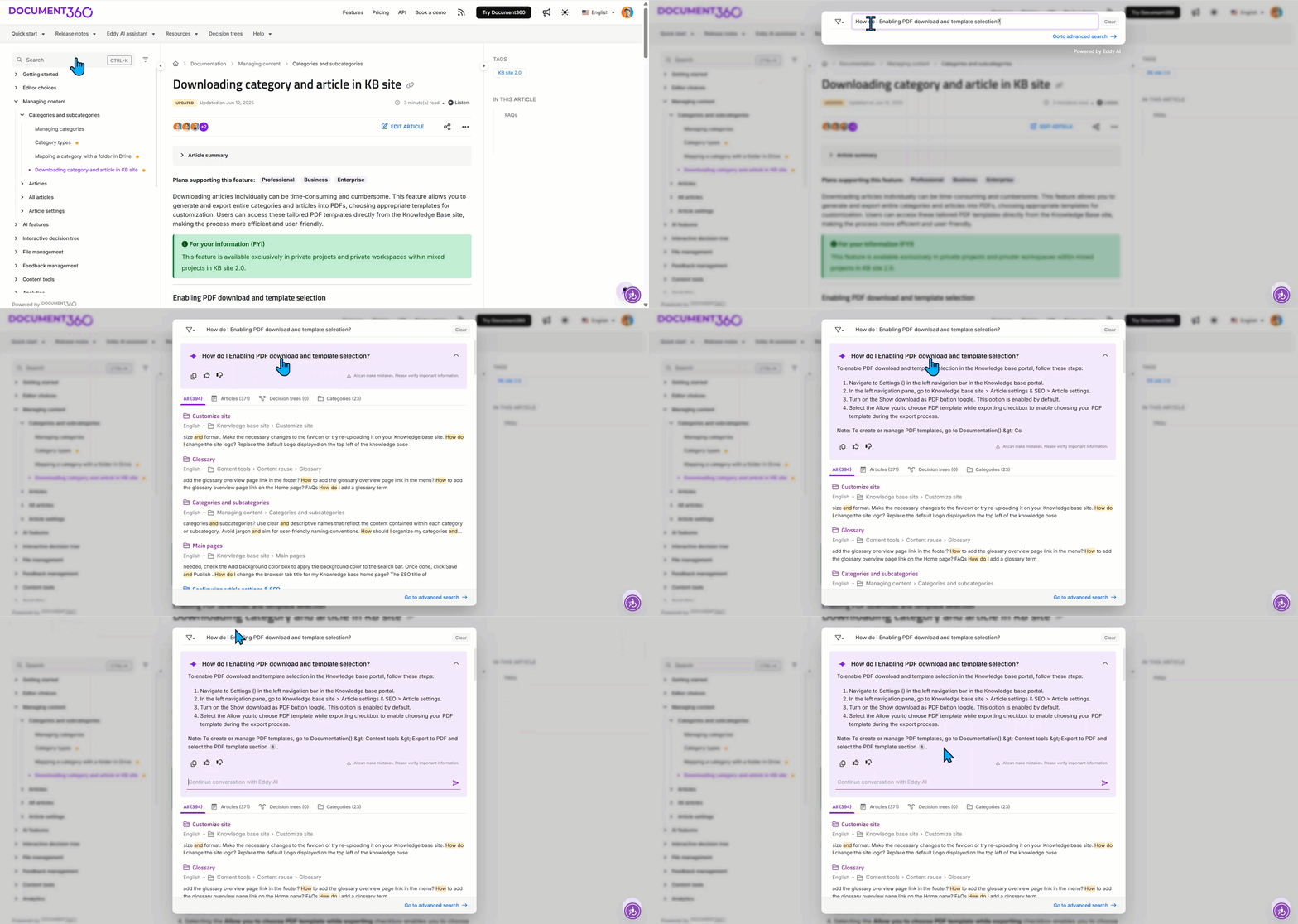
AI search is no longer a premium tier. It is the baseline expectation. Customers who type a half-formed question into a help center now expect the same conversational, context-aware answer they get from ChatGPT, Perplexity, or your own AI agent. A keyword-only search that returns ten article titles forces the user to do the second search themselves, and most of them do not bother.
On the authoring side, AI assistance has compressed the cost of producing a first draft. Technical writers who used to spend a day on a feature article can now produce a structured draft in twenty minutes from a video walkthrough, a PRD, or a transcript, and spend the saved time on accuracy, voice, and depth. The platforms that ship genuine writer-side AI, not just a generic GPT wrapper, have changed the unit economics of documentation.
The buying question is not “does it have AI“. Every platform claims that. The real question has three parts. Does it learn from your own documentation rather than the public web? Does it cite the source article in every answer it gives? Do the writer-side tools fit how your team actually drafts?
Version control tied to product releases
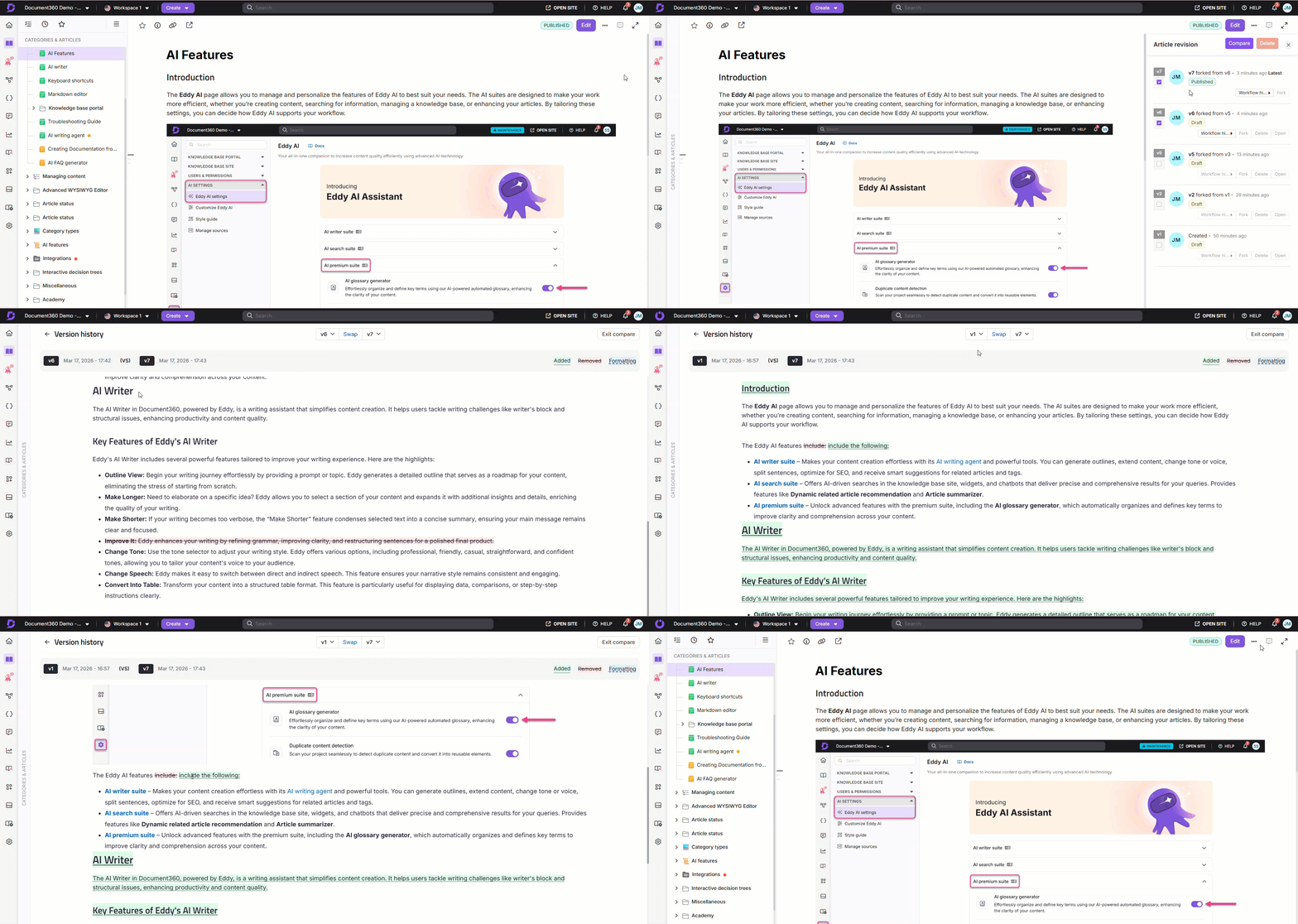
Documentation that does not track product versions becomes wrong within months. A customer following the v2.3 instructions on a v2.8 product hits a screen that no longer exists, files a support ticket, and the team gets pulled into reactive firefighting. Multiply that by every undocumented release, and the support backlog never clears.
Modern documentation platforms ship release-aware version control. You can publish a new version of an article tied to a product release, keep prior versions accessible for customers still on older builds, and roll forward without losing history. Engineering teams running continuous deployment need this baseline, and teams without it learn the lesson the expensive way.
Multi-language support without duplicating content trees
CSA Research surveyed 8,709 consumers across 29 countries and found that 76% prefer to buy products with information in their native language and 40% will not buy from a website in another language at all. For a SaaS product expanding internationally, English-only documentation is a measurable revenue drag.
The technical bar matters. A platform that requires duplicating an entire content tree for every new locale becomes unmanageable with two languages. The platforms worth evaluating handle localization as a workflow on top of the source content. Translators see context, the source article and translations stay linked, and updates propagate without manual reconciliation.
Integrations with your support and dev stack
Documentation that lives in a silo gets neglected. Documentation that lives inside the tools your team already uses gets updated. The platforms in serious consideration in 2026 integrate at the workflow level: Zendesk and Intercom on the support side, GitHub or GitLab for engineering, Microsoft Teams or Slack for daily collaboration, and a CRM hook into HubSpot or Salesforce, where customer context matters.
A logo on a marketing page does not pass the integration test. The real test is whether your support agents can surface and edit articles from inside a Zendesk ticket without context-switching, whether engineers can update API docs from a pull request, and whether new release notes trigger Slack notifications to the people who need to read them.
Analytics that change behavior
Most documentation platforms ship a page-views dashboard. The ones worth paying for ship analytics that tell you what to do next. Which searches return no results, so you know where your content gaps are. Which articles get viewed but rated unhelpful, so you know what to rewrite. Where customers drop off in a multi-page tutorial, so you know where users get stuck. Which keywords do your help articles rank for in Google, so you know which ones to expand?
Without behavioral data, documentation improvement is guesswork. With it, you can prioritize the next quarter’s content roadmap against actual user demand instead of internal opinion.
Publishing without engineering dependency
A documentation platform that requires raising a developer ticket for every content update becomes a bottleneck. Technical writers, product managers, and support agents all need the ability to write, review, and publish without an engineering handoff. That means a real WYSIWYG editor with Markdown support, a review-and-approval workflow that does not depend on Git, and role-based permissions that let you delegate publishing rights without losing editorial control.
How to Choose the Right Product Documentation
Choosing a platform is less about features and more about fit. Most buying mistakes happen when teams over-index on feature checklists and ignore how the tool fits their workflow.
Start with these four questions:
- Who is your primary audience?
If your documentation is customer-facing, prioritize search, SEO, and usability. If internal, collaboration and permissions matter more. - How fast does your product change?
Teams shipping frequent updates need version control tied to releases to avoid outdated documentation. - Do you need multi-language support?
If you are expanding globally, choose a platform that supports localization without duplicating content. - How will documentation integrate with your stack?
Your documentation should connect with support tools, engineering workflows, and analytics systems to stay relevant.
The right platform is the one that fits how your team works today while supporting where you will be in 12–24 months.
At a glance, the six capabilities that should be on every shortlist:
|
Capability |
What good looks like |
Failure mode if missing |
|
AI writing and search |
Trained on your docs, cites sources, assists writers in the editor |
Customers do a second search; writers draft from scratch |
|
Version control by release |
Tied to product versions, prior versions stay accessible |
Customers follow stale instructions; tickets climb after every release |
|
Multi-language |
Source-and-translation linkage; updates propagate |
Duplicate content trees; localization collapses past two languages |
|
Integrations |
Edits from inside Zendesk; GitHub PR triggers updates |
Docs live in a silo; nobody updates them |
|
Behavioural analytics |
No-result searches, drop-off pages, and helpfulness ratings |
Editorial roadmap is internal opinion, not user demand |
|
Publish without engineering |
WYSIWYG, role-based publish, review workflow |
Every typo fix needs a pull request; the content backlog grows |
Matching the Platform to Your Stage
Different team sizes have different documentation needs. The right platform when you are 10 people is rarely the right platform when you are 200, and the buyers who ignore stage end up either over-paying for capacity they will not use or hitting a ceiling six months after rollout.
Early-stage SaaS
Your documentation problem is volume, not sophistication. You have one product, a small team, and you need a platform that gets out of the way. Optimize for speed of authoring, low setup cost, and a clean customer-facing portal that does not require design work to look credible. Skip the enterprise features you do not need yet.
The buying mistake at this stage is picking a general-purpose wiki because it is cheap, then re-platforming nine months later when the help center cannot scale.
Growth-stage SaaS
You now have multiple personas reading your documentation, often in multiple regions. Multilingualism becomes a real requirement. Version control by release becomes critical. Internal and external documentation start needing different access permissions. The category leaders pull ahead at this stage because the gap between dedicated documentation platforms and repurposed wikis becomes visible.
This is the stage where most teams either invest in a platform built for the job or accumulate technical debt that takes a multi-quarter migration to clear.
Scale-stage SaaS
You are managing multiple products, multiple customer tiers, and probably multiple knowledge bases. Single sign-on, granular role-based permissions, an audit trail of every edit, and SOC2 compliance move from nice-to-have to non-negotiable. Translation and localization workflows have to support large volumes without breaking the link between source articles and their translations.
The decision criteria at scale are different from those in the early stage. You are not optimizing for setup speed. You are optimizing for governance, headroom on growth, and lower operational risk now that dozens of contributors are editing customer-facing content in production.
Why Product and Support Teams Choose Document360
Document360 is the documentation platform that Kovai.co built specifically for this category. We are not a repurposed wiki, an engineering-first tool that added a help center, or a general-purpose workspace bolted onto a knowledge base. The product was designed from the start for SaaS teams that need user docs, developer and API docs, and internal docs in one place.
Three differentiators show up most often when teams shortlist us:
Eddy AI. Our AI search and assistant suite is trained on your documentation and cites the source article in every answer. Writers get drafting assistance from the editor. Customers get conversational answers in the help center. AI agent integrations let downstream tools (chatbots and in-app assistants) read from the same canonical source.
Version control by release. Every article is versioned, every prior version is accessible, and you can publish documentation tied to a specific product release without losing history. Customers on older versions see the right instructions, customers on the latest see the new ones.
Multi-portal architecture. A single Document360 account can host multiple knowledge bases, separated by product line, customer tier, language, or audience. You manage them centrally, customize each portal’s branding and access independently, and avoid the cost and overhead of running parallel platforms.
Underneath those three sit the rest of the buying criteria above: native localization workflows, integrations across the tools your team works in (Zendesk and Intercom for support, GitHub for engineering, the chat tool of choice for collaboration, Salesforce or your CRM for customer context), behavioral analytics that drive editorial decisions, and a publishing experience that does not require engineering for content updates.
Check out How to Turn Video into Documentation Instantly Using AI
Closing Thought
Treat product documentation software in 2026 as just a help center tool, and you will under-invest. The real role it plays is the knowledge layer your support automation, your in-product assistance, and your AI agents all read from. The cost of picking wrong shows up far away from the license fee: in deflection, you do not get, churn you do not prevent, and ranking traffic you do not capture, compounding quietly for the eighteen months it takes to notice.