EN
EN  PT-BR
PT-BR FR
FR ES
ES DE
DE


📝 TL;DR
Most technical documentation underperforms for the same reasons. It is written for the product, not the user. It gets shipped once and is never maintained. And nobody measures whether it actually reduces support tickets. This guide covers the structure, writing process, and measurement habits that separate docs that deflect tickets from docs that just exist.
- Three types cover 95% of cases. User documentation, product and developer documentation, and project documentation. Most teams try to merge them and fail.
- Structure before prose. Quick-win task tutorials first, then overview, then deep guides, then reference. Readers enter at different layers depending on what they need.
- Write for goals, not features. Start from the job the user is trying to finish. Features are secondary.
- Test with real users. Internal review will miss the things that actually matter. Sit with three customers before a major release.
- Measure ticket deflection. If you cannot show the number of support tickets avoided, your documentation is flying blind.
- Maintain or retire. Stale docs are worse than no docs. Assign owners. Build a review cadence. Kill pages that nobody reads.
Technical documentation is where self-service support lives or dies. When it works, customers solve their own problems at two in the morning, and your support team focuses on the complex cases that actually need human judgment. When it does not, every small question becomes a ticket, every ticket becomes a cost, and your team ends up writing the same email forty times a month.
The numbers are striking. According to Salesforce research on customer self-service, 61% of customers would rather use self-service channels for routine matters, and self-service resolves an estimated 54% of customer issues at organizations that invest in it. Zendesk reports that 73% of consumers want the ability to solve issues on their own. Translated into operational terms, that means every product team is sitting on a ticket-deflection opportunity roughly the size of their entire support queue, if only their technical documentation could carry the load.
This guide is for the people who actually build that documentation. Product managers own the help center. Technical writers running the docs site. Support leads are watching ticket volume climb faster than headcount. Engineering teams are wondering why nobody reads their API reference. It covers what technical documentation is, the types you will actually need, a simple framework for structuring it, how to write it well, how to choose the right software documentation tools, and how to measure whether it works.
What Is Technical Documentation?
Technical documentation is any written or visual material that helps a specific audience understand and use a technical product, system, or process. The audience could be an end user following a user manual to complete a task, a developer integrating with an API using its documentation, or an internal engineer trying to understand how a system was built. The product could be a SaaS platform, a physical device, or an internal tool.
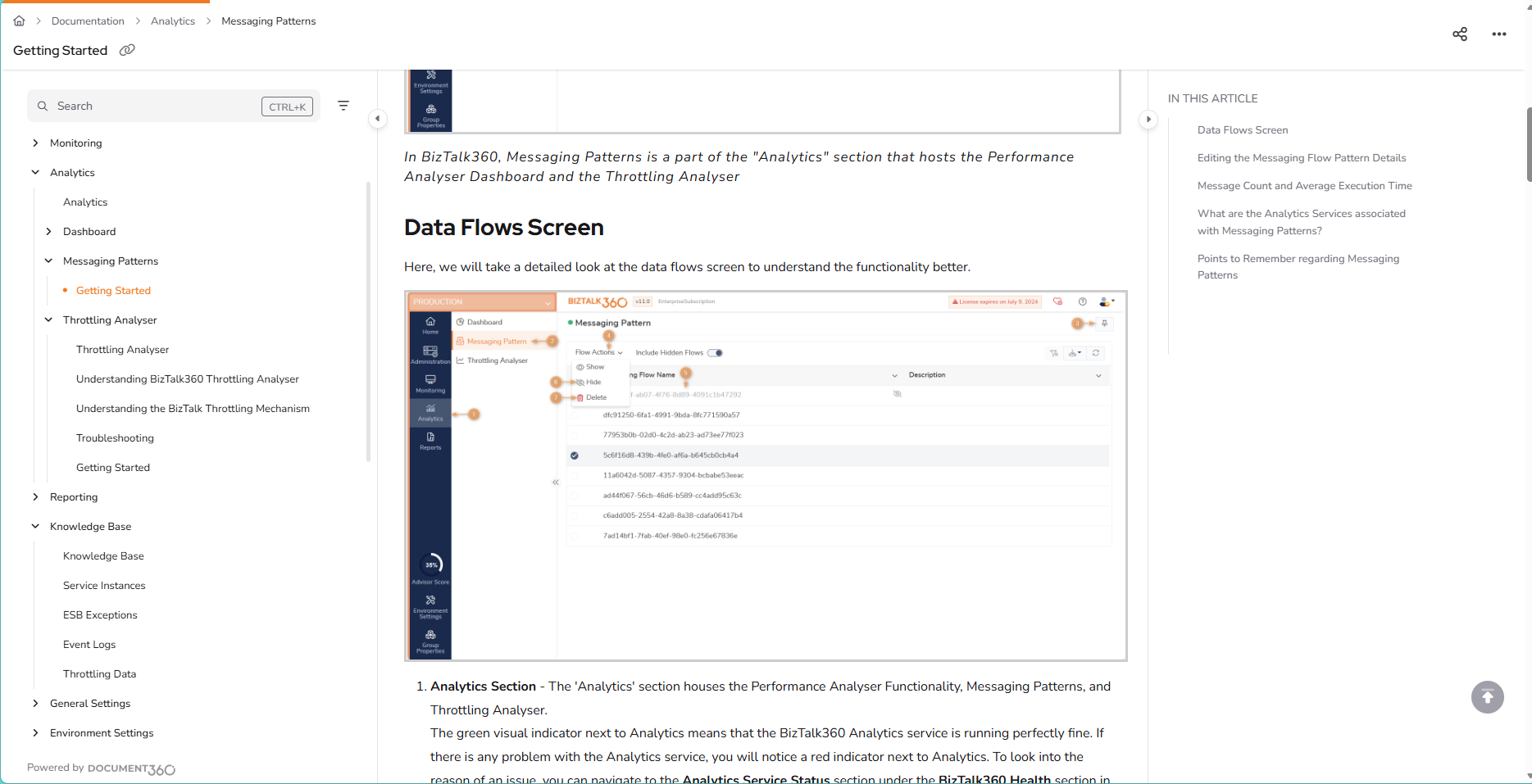
What separates technical documentation from marketing content or general writing is purpose. Marketing content exists to persuade. Technical documentation exists to enable. Good technical docs remove a block between a reader and something they are trying to do. They answer a question, walk the reader through a procedure, or give them the exact reference they need without making them read three other pages first.
The category covers more ground than most teams realize. Software docs, product docs, help articles for end customers, developer-facing API references, and private runbooks for internal teams all sit under the technical documentation umbrella. So do runbooks, architectural decision records, release notes, integration guides, and troubleshooting articles. They differ in audience and depth, but they share the same underlying goal: getting a specific reader from confused to productive as fast as possible.
Types of Technical Documentation
There is no universal taxonomy, but most product organizations end up with three families of documentation. They split roughly by who reads them and what question they answer. The ones that try to merge them usually produce a single document that fails all three.
|
Type |
Audience |
Typical artefacts |
Primary goal |
|
User documentation |
End users and customers |
User guides, tutorials, FAQs, troubleshooting articles, and help-center content |
Help users finish tasks without contacting support |
|
Product and developer documentation |
Developers, integrators, and internal engineers |
API documentation, SDK references, system architecture docs, technical specifications, release notes |
Enable integrations and safe engineering changes |
|
Project documentation |
Internal teams and stakeholders |
Project briefs, scopes, timelines, resource plans, requirements specs, meeting notes |
Keep the team aligned and decisions consistent |
The temptation is always to collapse these into one portal and call it done. Resist that. A developer looking up an API error code has nothing in common with a customer trying to reset a workspace setting. The layout, the words on the page, and even the visual treatment should look different. Most mature SaaS companies run three distinct surfaces: a help center for user documentation, a developer portal for API and integration content, and a private internal wiki or project space for project documentation.
The overlap between them is smaller than it looks. A product release note might appear in both the help center (customer-facing) and the developer portal (API changelog), but the two versions should be written differently. Same event, two different readers, two different jobs to be done.
A Simple Framework for Structuring Technical Documentation
Most docs portals fail because they mirror the shape of the product, not the shape of the reader’s question. A cleaner model is to organize the portal in four layers, each matched to how people actually read.
Layer one: quick-win task tutorials
The first thing a new user should be able to do is succeed at something small. A ten-minute getting-started path that takes someone from zero to a visible outcome. Set up the account, create the first project, send the first test request, and import the first dataset. Whatever the smallest useful moment of success looks like in your product, put it on the front page. If users cannot find it in thirty seconds, they will not stay long enough to read the rest.
Layer two: high-level overview and context
Once the reader has had a small win, they usually want to understand the shape of the whole thing. What are the main concepts? How do the pieces fit together? What should they learn next? This layer is the map. It does not teach everything at once. It gives readers enough orientation to pick the right next page. Think of it as the table of contents written as prose, with pointers into the detail below.
Layer three: guides for deep learning and use cases
This is where most of the word count lives. End-to-end walkthroughs of common workflows, configuration scenarios, and integration patterns. Each guide starts from a named job the reader is trying to finish (“import data from a CSV”, “set up single sign-on with Okta”, “build a customer-facing embed”) and takes them all the way through, assuming only what earlier layers have already covered.
Layer four: reference documentation
At the bottom is the dense, complete, searchable reference. API schemas, configuration options, error codes, parameter lists, and data dictionaries. This layer is rarely read linearly. Readers arrive via search, confirm the exact shape of something, and leave. It needs to be exhaustive and accurate. Tone is secondary. Precision is everything.
Readers do not move through these layers in order. Some arrive at layer four first because they searched for a specific error code. Others never leave layer one because their use case is simple. The point of the framework is not to force a path. It is to make sure every question a reader might have has a clear home, and the portal can answer it without making people scroll through the wrong layer.
Discover how Document360 keeps your documents accurate and findable.
Request a Demo
How to Write Technical Documentation, Step by Step
Five phases, in the order that produce docs people actually use. Skipping any one of them tends to show up later as complaints about the docs being “not quite right,” which is usually code for “the writer did not do phase one.”
Phase one: understand your audience and their goals
Before writing, answer two questions. Who is the primary reader? What are they trying to accomplish when they land on this page? A beginner trying to set up their first workspace needs one kind of writing. A system administrator deploying at scale needs a completely different one. The same topic can require two separate pages, because the underlying job is different.
Skill level matters, but intent matters more. A senior developer and a beginner might both need to reset an API key, and for that task, they need roughly the same page. Do not over-segment by persona when the job is the same. Over-segment when the job is actually different, not when you want to produce more pages.
Phase two: plan the structure and flow before you write
Good docs are architected, not typed. Before opening the editor, sketch the information hierarchy. What is the top-level navigation? Which articles belong in which section? What are the dependencies between articles? Which ones assume another has been read first?
Draw it on a whiteboard if you have one. Fight the urge to just start writing and shape it later. Structural problems that are easy to fix at the outline stage become expensive to fix once fifty articles exist, and each one links to three others. An extra hour of planning before writing saves weeks of restructuring later.
Phase three: write clear, actionable content
Technical writing rewards restraint. Short sentences. Plain words. Active verbs. Say it the way you would explain it to a new colleague who is standing at your desk, except with the screenshots and step numbers you would not bother with in person.
Break procedures into a numbered list with one action per step. If a step has three sub-actions, it is actually three steps. Lead each section with what the reader will be able to do by the end of it, then deliver. Cut any sentence that does not move the reader closer to the outcome. Technical prose that tries to sound sophisticated is almost always hiding unclear thinking.
Phase four: use examples, screenshots, and visuals
Text alone does heavy lifting in technical documentation, but it is not enough. Screenshots for UI-based tasks. Code samples for anything developer-facing. Diagrams for architectural concepts that involve more than two moving parts. Annotated images for anything with a “click here” instruction.
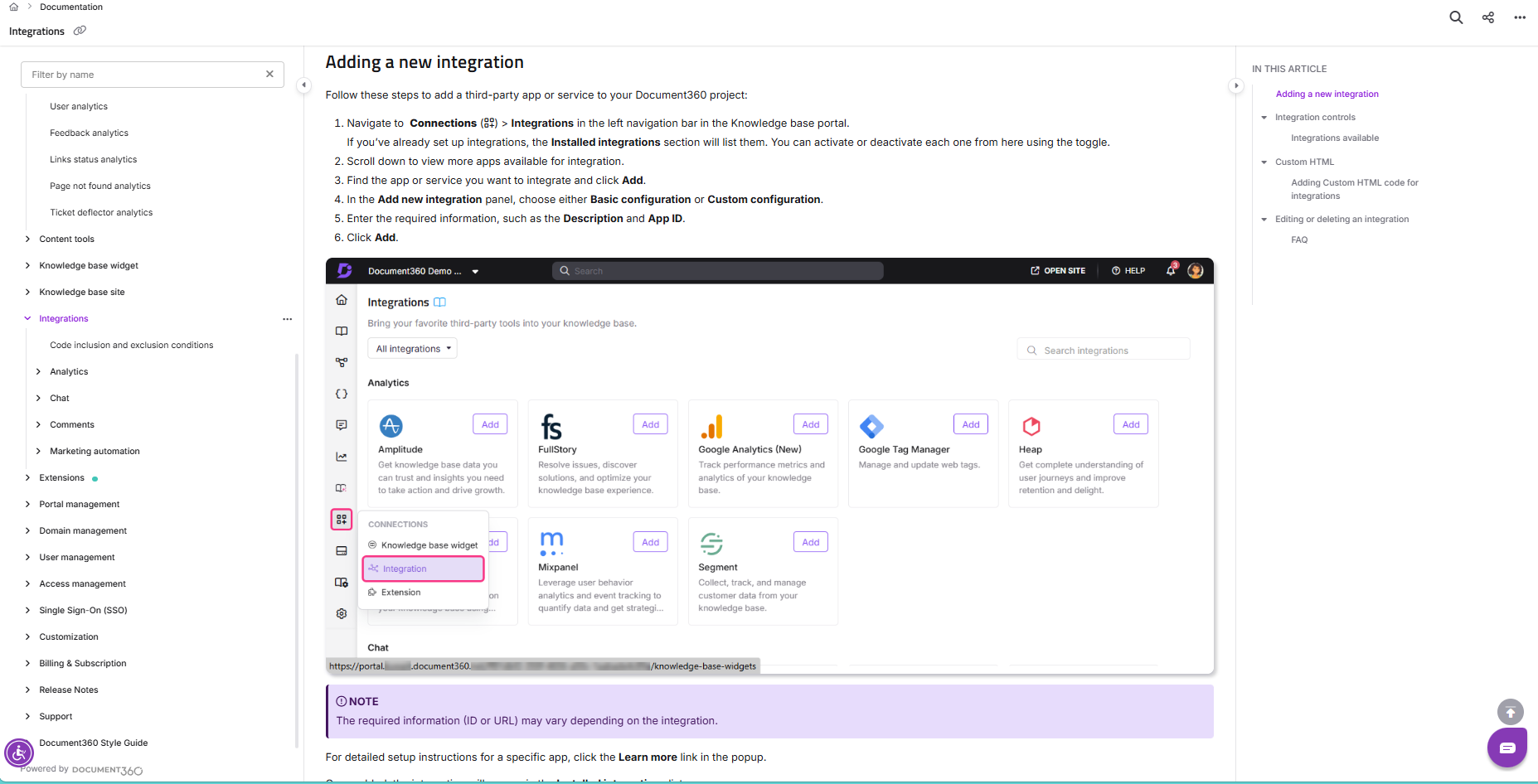
The rule is show, then tell. A screenshot followed by two sentences of explanation is usually clearer than four paragraphs of prose. Use real example data, not placeholders like “your-api-key-here” (which developers copy verbatim and then wonder why nothing works). Test every code sample you publish. If the example is broken, the whole article is broken, no matter how well-written the prose is.
Phase five: review, test with real users, and update on a cadence
Internal review catches typos and factual errors. It does not capture what actually matters: whether the reader can complete the task the article promises. For that, you have to watch real users try.
Before a major release, pick three customers or beta users who have not seen the article. Ask them to complete the task. Sit next to them on a video call. Say nothing. Note every hesitation, every scroll, every moment they re-read a sentence. Those are the edits that matter. Typos are cheap to find. User confusion is not, and it is where most of the ticket load will come from after launch.
Then build a maintenance cadence. Every article has an owner. Every article has a last-reviewed date visible to readers. Every release that touches a feature triggers a review of the related docs. Unmaintained documentation decays fast. Six months of drift is enough to make an article wrong in ways that are worse than having no article at all.
Technical Documentation Best Practices
Write for user goals, not product features
A feature-led table of contents reflects the shape of the product. A goal-led one reflects the shape of the customer’s job. “Configuring webhooks” is a product-led heading. “Sending notifications to Slack when a deal closes” is a goal-led heading, and it is the one your customers will search for. Feature pages can still exist as a reference, but the primary navigation should lead with jobs.
Keep steps minimal but reproducible
Every step that is not strictly necessary is a step where a reader can get lost. Cut ruthlessly. At the same time, every step that is necessary must be explicit, because an experienced writer will often skip the step that they consider obvious, which is exactly the step a new user will miss. The test: Can someone who has never seen the product follow these steps and reach the stated outcome? If not, the instructions are wrong, even if every sentence is technically correct.
Keep the same shape across every article
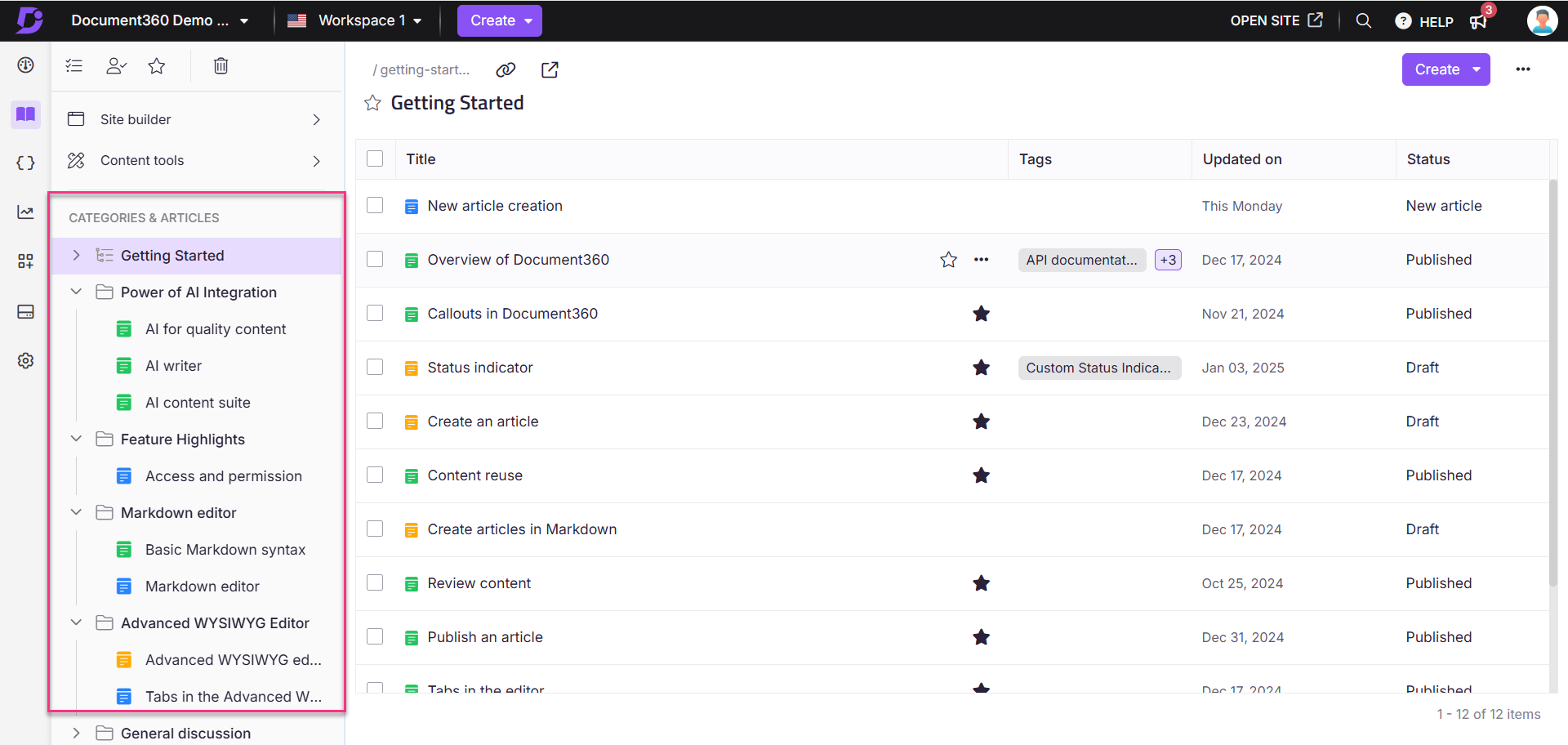
Readers learn your documentation the same way they learn a product. When every how-to article starts with “what you will learn,” ends with “what to do next,” and uses the same heading pattern in the middle, readers stop having to learn the docs and start focusing on the task. Document360’s category and tag system helps keep that consistency at scale by letting you enforce templates, manage article hierarchies, and use workspaces for different products or audiences. The structure becomes invisible, which is exactly what you want it to be.
Link to related content instead of repeating it
The most common sign of an out-of-control docs site is the same paragraph appearing in four different articles. It feels helpful while you are writing. It becomes a maintenance nightmare the moment the underlying information changes, and you update three of the four copies. Every concept should have one canonical home. Every other article that needs it should link to that home. Single source of truth, applied to prose.
Make the docs findable, not just published
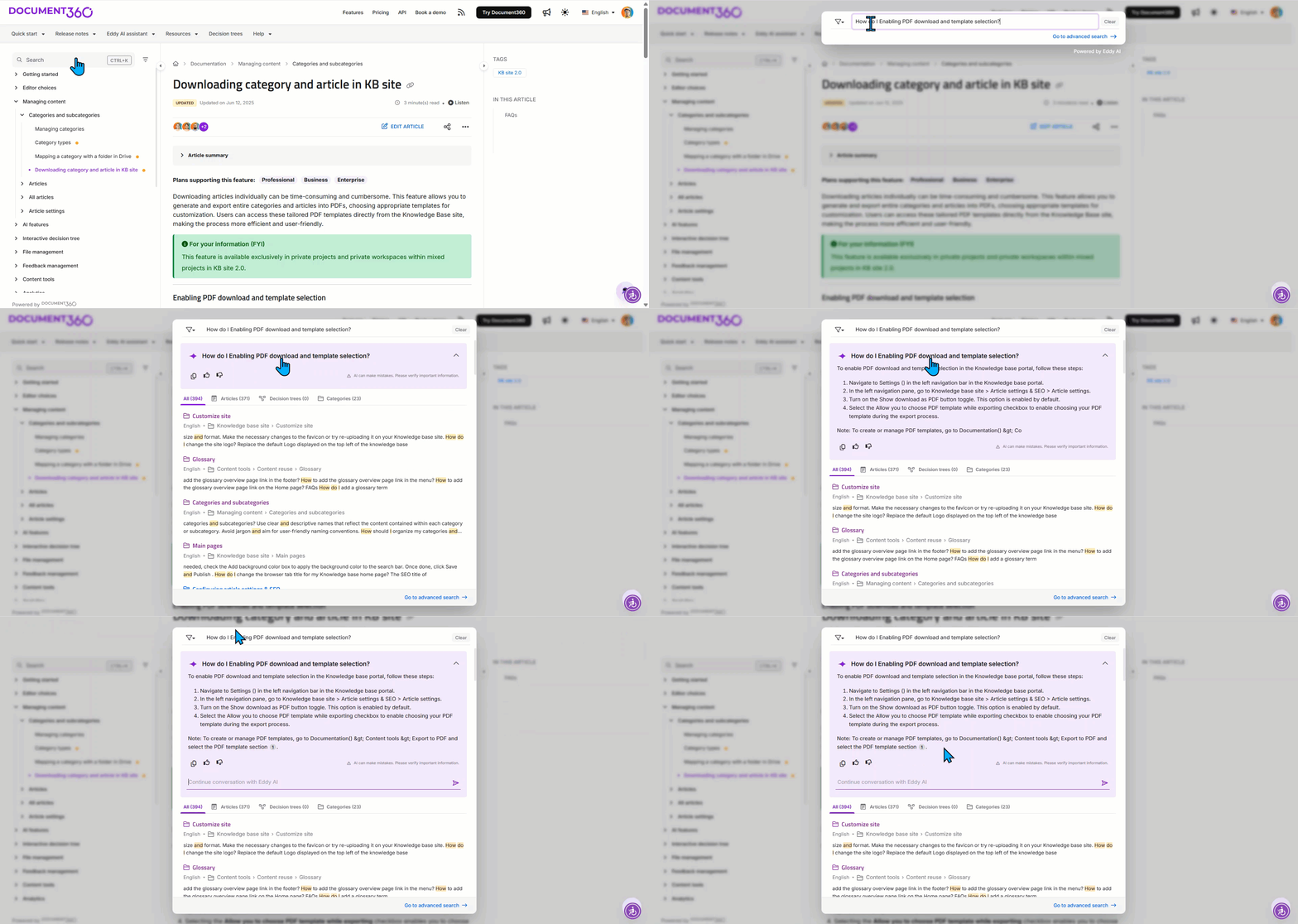
Writing good content is half the work. The other half is making sure people can find it at the moment they need it. In-product help links. A search box that copes with typos, synonyms, and the words your customers actually use (which are often not the words your product team uses). A navigation tree that still works at five thousand articles, not just at fifty. Document360’s Eddy AI search reads intent rather than keywords, so it returns the right article even when the words a customer types are nothing like the words in the article title. Good search is the difference between docs that deflect tickets and docs that quietly pile up unread.
Define “done” as enough for independent execution
A common failure mode is the half-written article. It explains the happy path, skips the edge cases, and leaves the reader stranded the moment something unexpected happens. The working definition of “done” should be: a user with the stated prerequisites can complete the task without needing to open a support ticket. Anything less is a draft, even if it looks finished.
▶️ Check Out How to Create Technical Documentation with Document360
How to Measure Whether Your Technical Documentation Is Working
Documentation without measurement is an article of faith. You write, you publish, you hope. When ticket volume climbs or NPS drops, nobody is sure whether the docs are the cause or the cure. A handful of metrics, tracked consistently, turns documentation from a cost center into an instrument you can tune.
Ticket deflection rate
This is the number that matters most. What percentage of potential support tickets are resolved by documentation before a customer contacts support? The simplest proxy is the ratio of help-center article views to support tickets in the same period. A more rigorous version tags articles that appear in support-ticket searches and tracks whether the customer still filed a ticket afterward. Either way, the direction of the number over time is what matters. If articles are landing, deflection goes up. If they are not, it does not.
Search success rate
What fraction of searches on your docs site return a result that the user clicks? What fraction leads to a dead end or a refinement? Failed searches are your content backlog, handed to you by your users for free. Track them weekly. Every repeated failed search is either a missing article or an existing article with the wrong title.
Article views versus ticket volume for the same topic
For any topic that generates support tickets, compare how often the related article is being viewed. If ticket volume is high but article views are low, the article exists, but nobody is finding it (navigation or search problem). If both are high, the article is being found but not actually answering the question (content problem). That comparison tells you where to focus.
Time to resolution through self-service
How long does a user spend on a help article before they either act on it or leave? Fast action means the article worked. Long dwell followed by a ticket means it did not. Pair this with helpful-or-not votes on each article to get a signal per page, not just per topic.
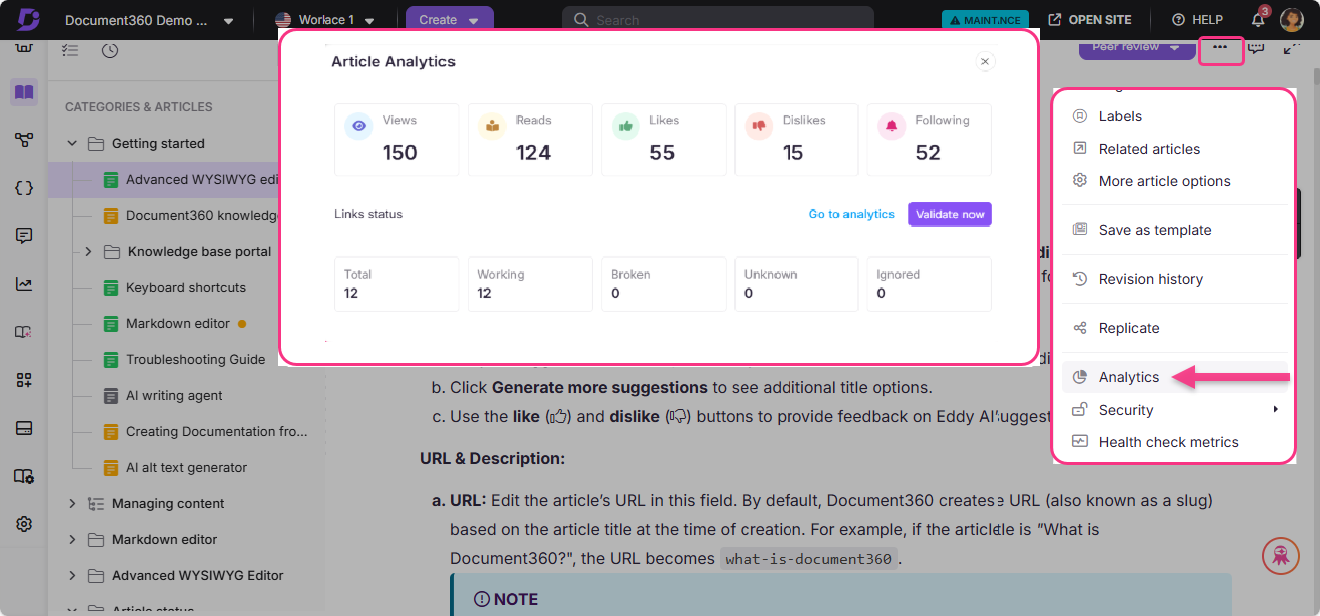
The value of these metrics compounds when they are visible in the same place as the content. Document360’s built-in analytics show article views, search queries, helpful votes, and the path readers took through the documentation, so the feedback loop between publishing and improving is short enough to actually close. The point is not to produce a dashboard. The point is to know which articles to rewrite next.