EN
EN  DE
DE ES
ES FR
FR PT-BR
PT-BR

AI Summary
- Multiple JWT Configurations: Document360 supports up to five independent JWT configurations per project, with separate client IDs, URLs, tokens, domain mapping, branding, and programmatic Customer API management. JWT and SSO can work together.
- MCP Server Analytics: A dedicated dashboard reports call volumes, request activity, success and failure rates, tool usage, active users, top MCP clients, and adoption trends for AI integrations.
- Knowledge Base Personalization: Logged-in readers can favorite articles, decision trees, API endpoints, and page categories. Administrators can reorder modules and keep Export PDF, Share, and Follow actions visible in a sticky header.
- PDF Customization: Exports support dynamic metadata placeholders, customizable end pages, reorderable sections, and direct access from private knowledge base Notifications.
- Other improvements include inherited category permissions, affected-endpoint handling for API reference updates, and enhanced Feedback Manager filtering, volume visibility, and shareable links.
AI-generated content. It may contain errors.
See Document360 in action
Document360’s May updates are built around a growing reality in modern documentation where a single authentication setup is no longer enough for teams managing multiple products, customer environments, and access experiences.
The release introduces major improvements that help teams manage authentication at scale, understand how AI systems consume their knowledge, and deliver more personalized documentation experiences. From support for multiple JWT configurations to MCP server analytics and enhanced knowledge base personalization, these updates are designed to give teams more flexibility and visibility across their documentation ecosystem.
Let’s explore how these updates improve documentation and enhance user experience.
Support for Multiple JWT Configurations
As organizations scale across multiple products, customer portals, business units, and authentication systems, managing access through a single JWT configuration quickly becomes restrictive.
Until now, projects relying on JWT-based authentication had to work within a single configuration setup. For enterprise teams supporting multiple domains, brands, or authentication experiences, this often meant operational workarounds and additional complexity.
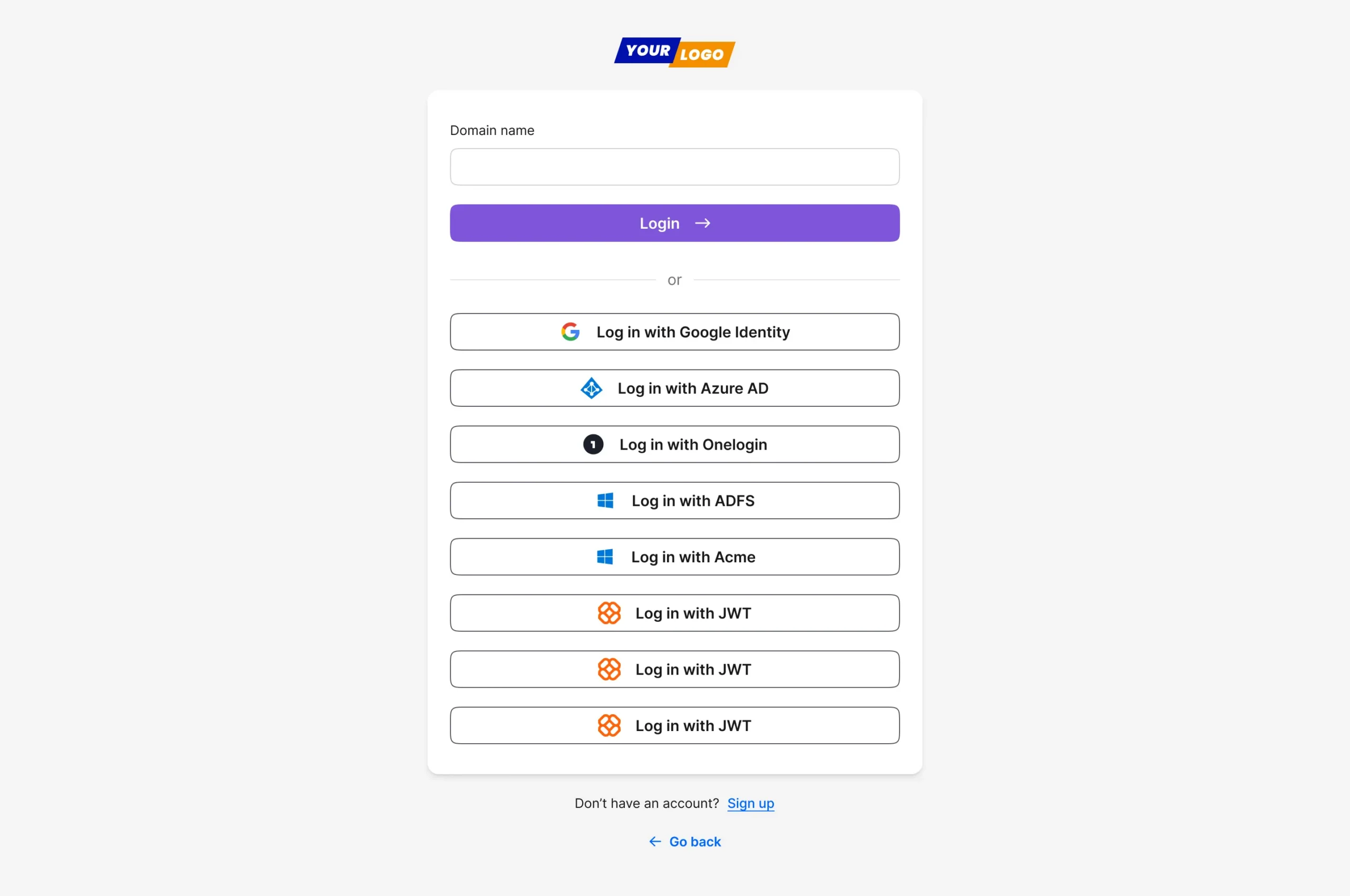
Document360 dynamically presents the appropriate authentication options based on your configured JWT and SSO providers, creating a seamless login experience across multiple domains and user environments.
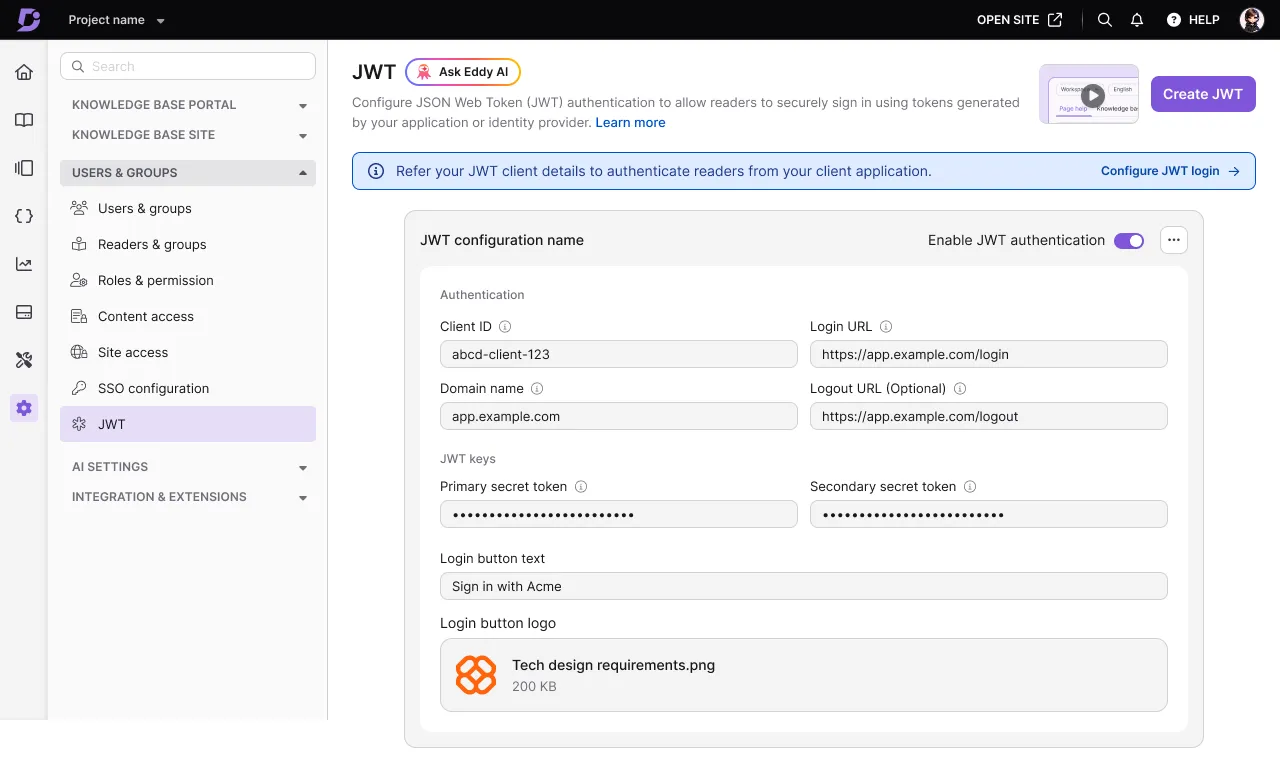
Configure independent JWT authentication setups with dedicated client IDs, domains, login URLs, secret tokens, and custom branding, giving administrators greater flexibility in managing access across multiple customer environments.
With this update, Document360 now supports up to five JWT configurations within a single project. Each configuration can maintain its own independent setup, including client IDs, login URLs, logout URLs, secret tokens, and domain mapping.
This gives enterprise teams far greater flexibility in how authentication is managed across different customer environments and use cases. Administrators can independently enable, disable, or manage each configuration without impacting others.
The login experience has also become more adaptable. Branded JWT login buttons can now be configured with custom text and logos, while the knowledge base login page dynamically adjusts based on the enabled authentication methods. JWT and SSO configurations can now work together within the same project, allowing organizations to support multiple authentication flows simultaneously.
Beyond UI improvements, new Customer API endpoints also make it possible to create, update, and manage JWT configurations programmatically, helping teams automate authentication workflows at scale.
✅ Tip
You can combine JWT and SSO configurations within the same project, giving different user groups the authentication experience that best fits their environment.
See how Document360 helps teams scale authentication, personalize experiences, and understand AI-driven knowledge consumption.
Book a Demo
MCP Server Analytics: Visibility Into How AI Systems Consume Your Knowledge Base
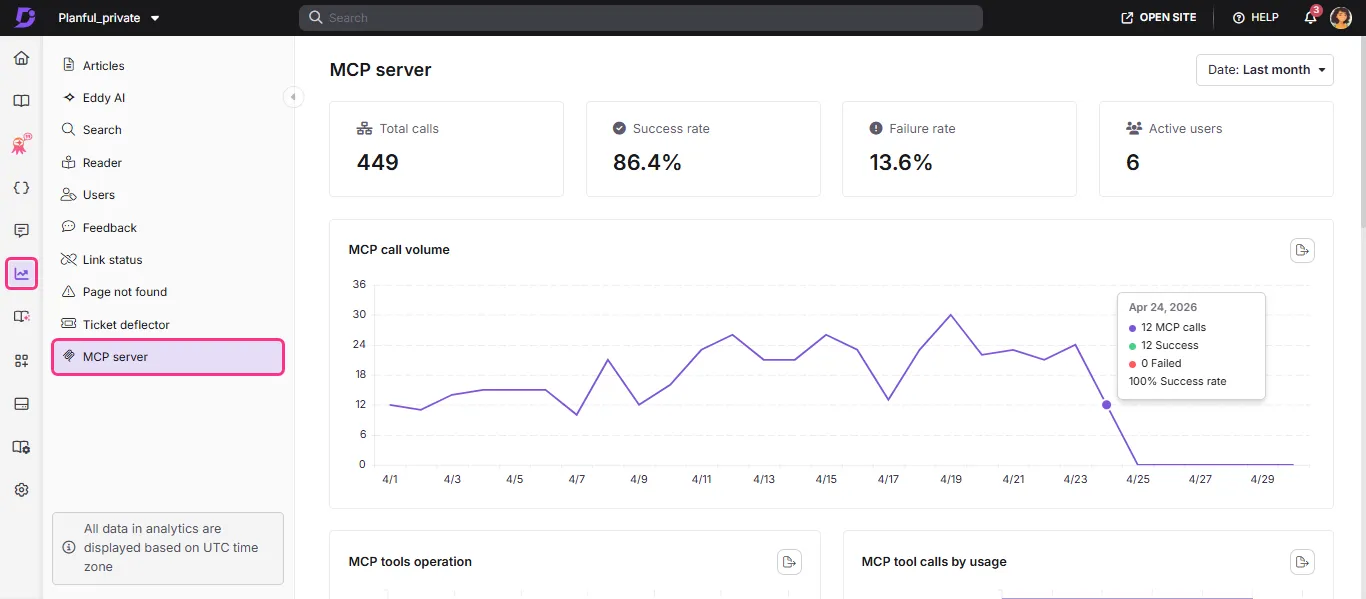
The MCP Server Analytics dashboard provides visibility into how AI assistants and tools interact with your knowledge base, helping teams monitor call volumes, success rates, active users, and overall MCP adoption trends.
As AI assistants and MCP-powered workflows become an increasingly important part of how users consume documentation, teams need visibility into how their knowledge base is accessed beyond traditional search and page views.
With this release, Document360 introduces a dedicated MCP server analytics dashboard that helps teams understand how AI tools interact with their knowledge base.
The new dashboard provides visibility into key metrics including:
- Call volumes and request activity
- Success and failure rates
- Tool usage patterns
- Active users and top MCP clients
- Adoption trends across AI integrations
This gives teams a clearer understanding of how their documentation is consumed within AI ecosystems and helps measure the operational value delivered through MCP integrations.
Instead of treating AI integrations as black boxes, teams can now monitor usage patterns, identify issues, and better understand how external AI systems engage with their content.
This marks another step toward helping documentation teams prepare for increasingly AI-driven knowledge experiences.
💡 Did You Know?
Most documentation teams track page views and search queries but have zero visibility into how AI assistants consume their content. An AI tool can call the same article 400 times a day, and it won’t show up in your standard analytics dashboard.
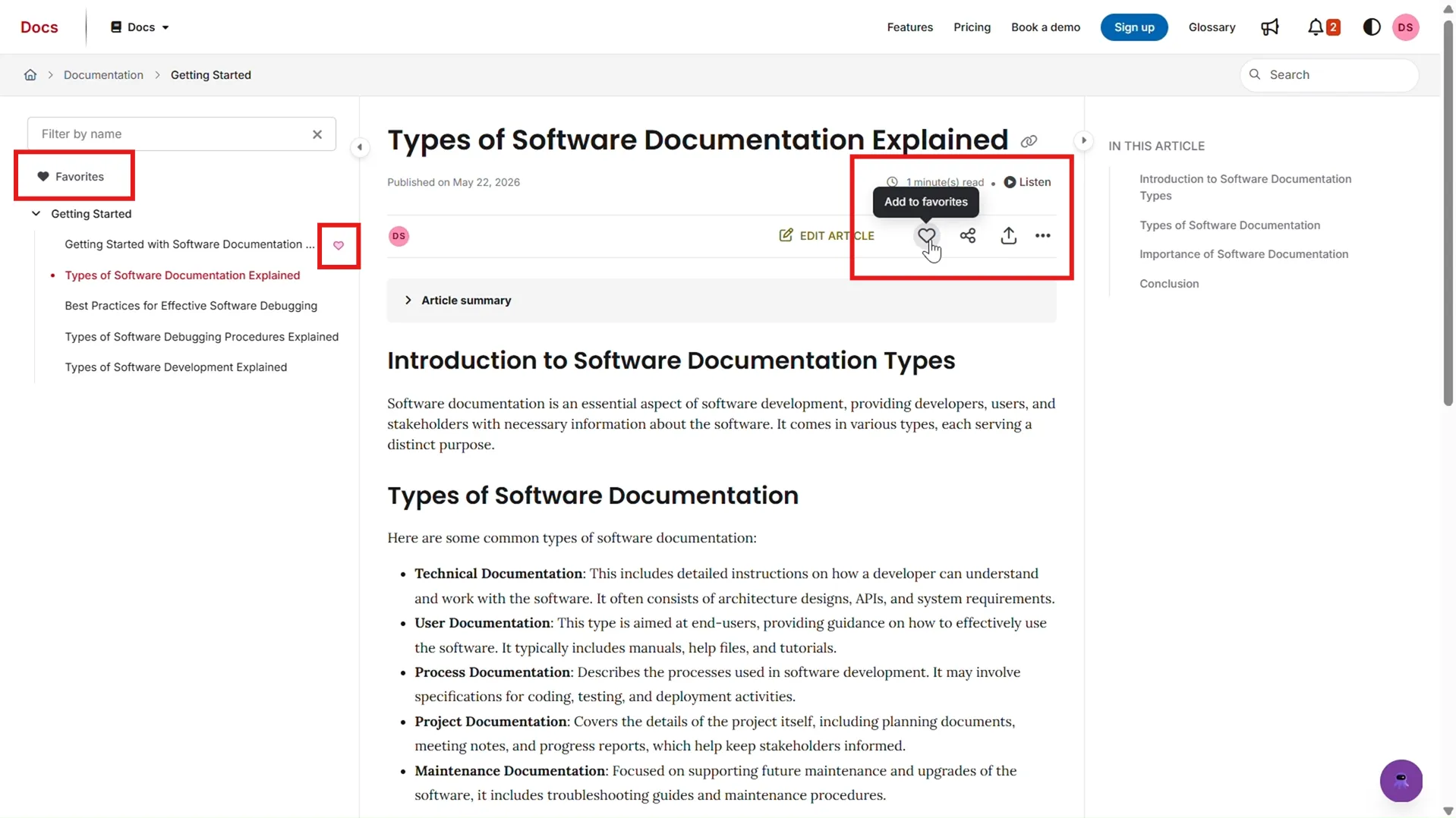
The new Favorites feature allows logged-in readers to bookmark content directly from the knowledge base and access all saved resources from a dedicated Favorites section for quicker navigation.
Enhanced Knowledge Base Personalization with Favorites: A More Reader-Centric Documentation Experience
Documentation experiences become significantly more effective when readers can personalize their interaction with content.
This update introduces several improvements to KB Site, focused on improving navigation, discoverability, and reader convenience.
Logged-in readers can now mark articles, decision trees, API endpoints, and page categories as favorites directly from the knowledge base using the heart icon. Saved items can then be quickly accessed from a dedicated Favorites section or directly through the reader profile.
The knowledge base layout itself also becomes more flexible. Administrators can now reorder right-panel modules like ‘Files’, ‘Tags’, ‘Related Articles’, and ‘In This Article’ using drag-and-drop controls. Related Articles can also be repositioned between the right panel and the article footer to suit the preferred reading experience.
To further improve usability, key actions such as ‘Export PDF’, ‘Share’, and ‘Follow’ now remain visible in a sticky header as readers scroll through the content.
These improvements help create a more personalized and efficient reading experience while giving administrators greater control over how documentation is presented.
Advanced PDF Customization: More Control Over Branded Documentation Exports
PDF exports continue to play an important role for teams distributing offline documentation, customer handbooks, compliance documents, and internal knowledge resources.
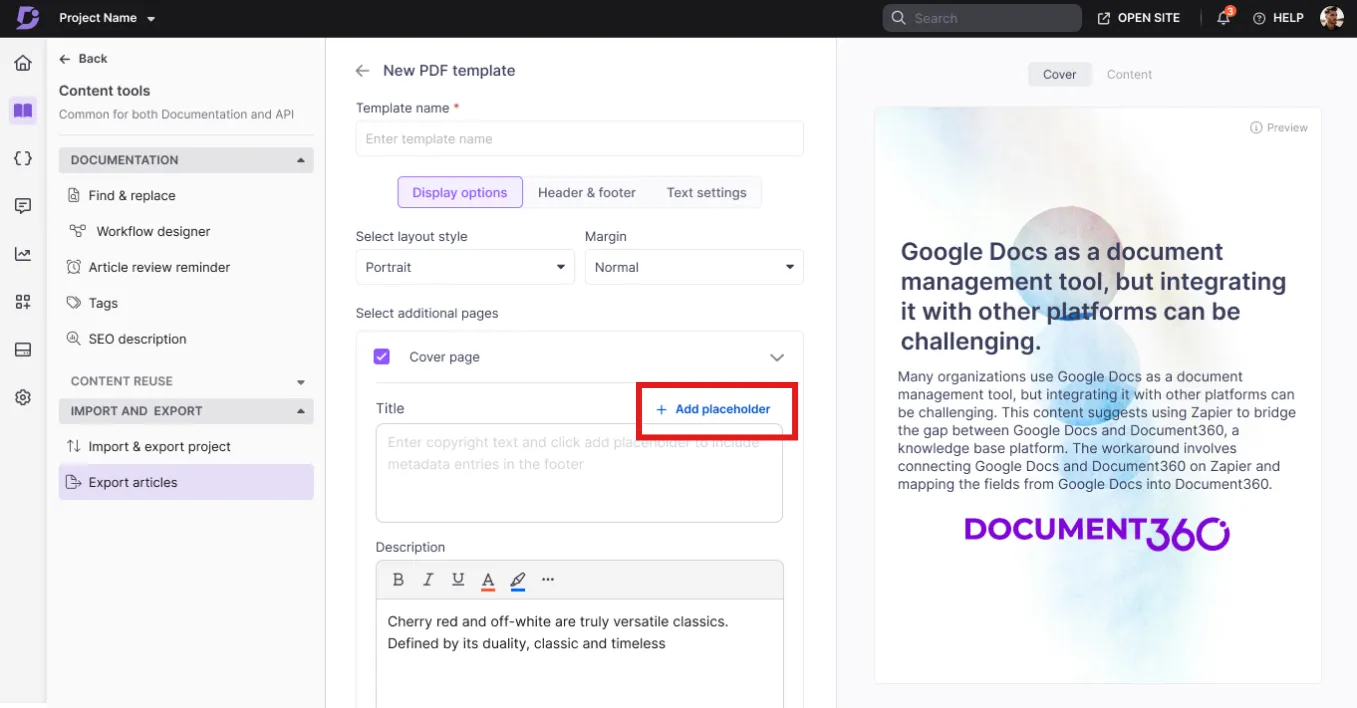
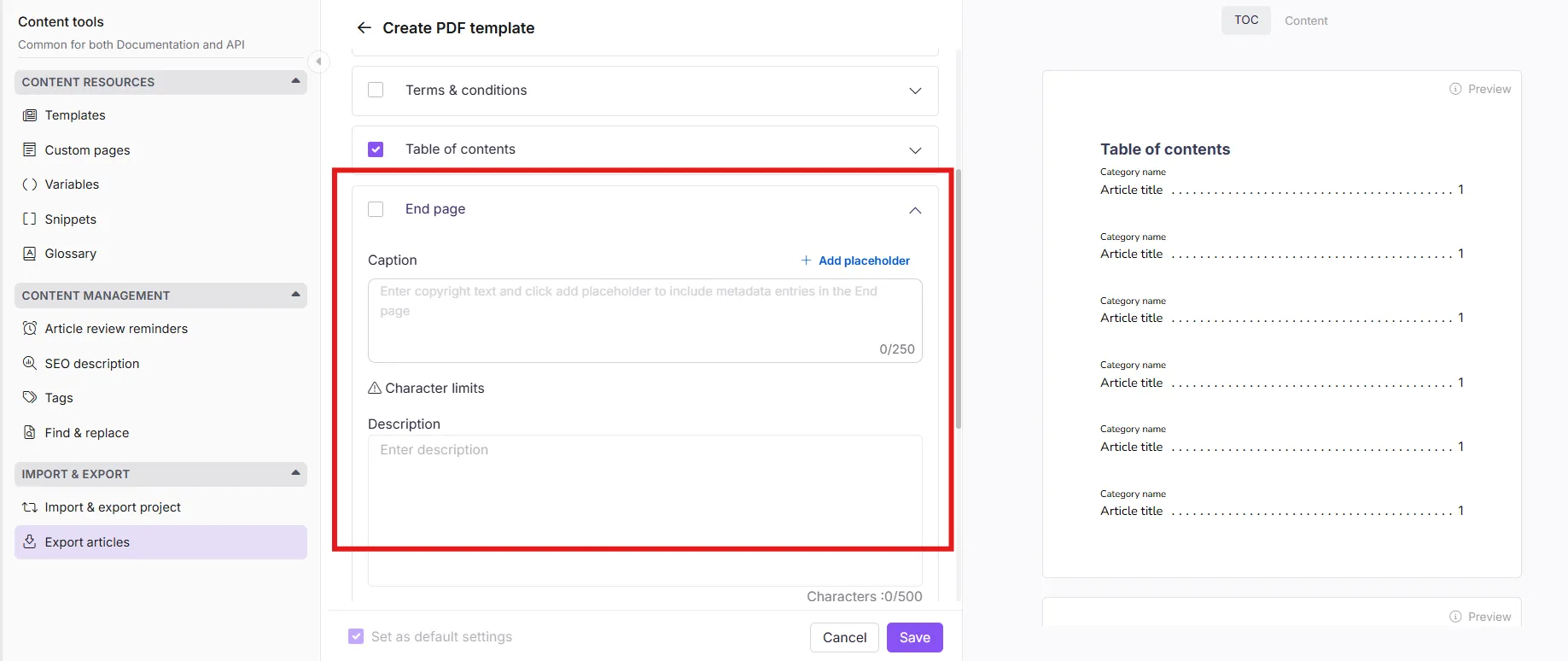
Advanced PDF customization enables dynamic metadata placeholders across cover pages and footers, customizable end pages, and flexible PDF template configurations, helping teams create more branded and consistent documentation exports.
This update significantly expands PDF customization capabilities within Document360.
Dynamic placeholders can now be inserted into PDF footers, cover pages, and the newly introduced customizable end page. Administrators can automatically populate metadata such as article titles, versions, and languages without manually editing export templates.
The new end page can also be fully customized with configurable titles, descriptions, logos, background images, text alignment, and color controls.
In addition, sections like Table of Contents, Terms & Conditions, and Version History can now be reordered using drag-and-drop controls, giving teams greater flexibility in how exported documentation is structured.
PDF exports from private knowledge bases have also become more accessible. Readers can now directly access exported PDFs from the Notifications section without depending on email delivery.
These updates help teams create more polished, branded, and operationally flexible documentation exports.
Other Notable Improvements
PDF exports directly from KB site notifications
Readers on private knowledge base sites can now directly access and download exported PDFs from the Notifications section without relying on email delivery. These exports continue to follow the same admin-configured PDF template settings, including cover pages, footer metadata, custom file naming, and bulk export templates, ensuring a more seamless and consistent export experience.
Inherited reader permissions for categories
Reader and reader group permissions can now automatically inherit from parent categories to all subcategories. This simplifies access management for large documentation structures while reducing the need for repetitive manual permission configurations.
Enhanced API documentation management
API documentation workflows now provide better visibility and control during API reference updates. When an uploaded API reference file changes existing endpoint URLs, users are shown a list of affected endpoints before proceeding. Affected endpoints are automatically moved to the Recycle bin, where their content can be previewed and permanently deleted, helping teams manage endpoint changes more cleanly and efficiently.
Feedback Manager improvements
Feedback Manager now includes better visibility into total feedback volume, filtering for comments, and shareable feedback links for easier collaboration and review workflows.
Conclusion
These updates highlight how Document360 continues to evolve alongside the growing demands of modern documentation teams, helping them manage authentication, personalization, and knowledge delivery with greater flexibility and control.
That’s the focus behind every update this month, giving teams more flexibility, visibility, and control across modern documentation experiences.