 EN
EN  PT-BR
PT-BR FR
FR ES
ES DE
DE


A knowledge base is a highly powerful tool that grows over time with valuable information that enables your users to help themselves. Unfortunately, when the amount of content you publish in your knowledge base increases, the more likely your knowledge base is to become out of control.
There are a few different cases where knowledge bases start to become less helpful, and the one we’re talking about here is duplicate content. Often, knowledge bases are maintained by multiple teams, managers, and contributors, and lack oversight for their content strategy.
Instead of being a tool that can attract traffic and interest in your products, or help customers with their problems, poorly structured knowledge bases are their own worst enemy and lead to missed opportunities for helping customers. Knowledge base owners who look for ways to improve their site and help customers will build a better brand reputation, increasing retention and sales.
On the one hand, you need to look for duplicate content and identify fixes that need applying, but this can take time.
Then, on the other hand, you need to apply the fix and decide which method to use depending on your intentions for the content.
📝 TL;DR
- In a knowledge base, you need to look for duplicate content and identify fixes that need applying – but this can take time.
- You can merge similar articles, use redirects or canonicals, rewrite thin pages, apply no-index tags, or replace repeated text with reusable snippets.
- It’s important to choose the right method based on your goals for the content and its SEO impact.
- Automation is key to efficient duplicate content management.
- Document360’s Eddy AI automates the detection and highlights duplicate articles, making it easier to clean up your KB, improve consistency, and boost search performance.
What Is Duplicate Content in a Knowledge Base?
Duplicate content in your knowledge base usually means having pages with the same content appearing in your knowledge base. SEO crawlers aren’t smart enough to decide which is the best page to appear in the search results, so you risk jeopardising which pages should appear.
Using the same images is usually okay (within reason), but abusing copyright is not. If you’re not sure what counts as duplicate content, there are tools that can help.
Duplicate content is not always accidental. Alternatively, companies might use pages with the same content as placeholders within the structure of their knowledge base. This might seem innocent, but all counts as duplicate content within the domain of SEO, and can also hurt your search engine ranking.
Duplicate content is especially abundant in the enterprise knowledge bases that stretch to thousands of pages, and is more likely to occur when there is a lack of oversight in the content management of your knowledge base. Some might duplicate content intentionally (for example: “API Authentication (v2)” vs. “API Authentication (v3)” but much is unintentional.
Why Is Having Duplicate Content an Issue for SEO
You might not think that duplicate content for your knowledge base is a problem, but search engines disagree. If you have any ambitions for search, then you’ll need to consider these reasons why duplicate content should be addressed and, ultimately, fixed.
- Search Engine Confusion – When you have multiple pages that are competing for the same ranking, search engines don’t know which pages they should choose to match the search results. This really hurts your knowledge base site’s representation in the search results and creates an unprofessional impression of your company.
- Diluted Page Authority & Ranking Conflicts – When you have pages competing for the same terms and ranking as each other, this dilutes your page authority and search engines may end up choosing a different site for that particular term. Ranking conflicts mean more than one page is a likely candidate for SEO, and you can’t control which page ends up with the position in the search results.
- Loss of Search Visibility – As SEO issues increase, this results in a loss of search visibility, and searches that you know should lead to your site don’t make it there. Instead of being in one of the top three results, your knowledge base is far down (if represented at all), and customers or potential customers can’t find what they need when searching for your company.
Naturally, if you have ambitions to rank in the search results, duplicate content raises these very important issues when it comes to authority and visibility.
How to Identify Duplicate Content in Your Knowledge Base

Of course, once you’re aware that duplicate content is an issue, the next step is to identify it in your own knowledge base. Understandably, this prospect can be daunting, especially when your knowledge base stretches to thousands of pages.
- Manual Identification Methods – you can manually go through your knowledge base and identify pages that are replications of one another and take steps to fix them. You can make a list of all the pages you find and highlight all the pages that duplicate content. This method is the most time-consuming way to find duplicate content, and it is also not foolproof because you might miss pages.
- Using Automation to Detect Repeated Blocks – To simplify this process, Document360 introduces the Duplicate Content Detection feature, an intelligent system that identifies and reports duplicate content across your entire project. This helps you detect, review, and manage repeated information efficiently. When a user initiates a scan, Eddy AI analyzes all articles within the project, comparing content side-by-side instead of breaking sentences midway.
- Reviewing Duplicate Reports Efficiently – Document360 shows you a clear list of repeated paragraphs along with the articles they appear in and the percentage of duplication after each scan. For accuracy, only similarities above 80% are highlighted, making it easy to identify truly duplicated content across your knowledge base. Once the scan completes, a detailed report helps you review these duplicates and suggests creating reusable snippets, ensuring consistency and simplifying future updates.
- Using Snippet Suggestions to Improve Consistency – as mentioned, snippets are reusable content that you can set up in your knowledge base for when you need to repeat content but want to avoid search engine issues. Your snippets reside in a kind of centralized bank, and you can insert them where you like in your knowledge base: for example, the boilerplate text for your company’s product.
- Managing Ignored or Low-Value Duplicates – in Document360, you can find the ignore tab, which means that users can skip the article based on the cases, and in future scans, Eddy AI won’t crawl it. Some pages just aren’t worth the effort of maintaining and can even prove harmful to the content that you do want to rank. If these pages are ignored or have low value, you can consider deleting them so they no longer interfere with the SEO of your knowledge base.
Whether manually or automatically, it’s important to first identify the duplicate content that you have present in your knowledge base. Duplicate content often appears when multiple teams create new articles instead of updating existing ones. By adding structured permissions, review stages, and mandatory content checks, you can guide authors to verify what already exists before they publish. This reduces unintentional duplication and ensures updates follow a controlled process that maintains the integrity of your knowledge base.
Detect duplicate content in your knowledge base and take the right steps to fix it with Document360
Book A Demo
How to Fix Duplicate Content in Your Knowledge Base
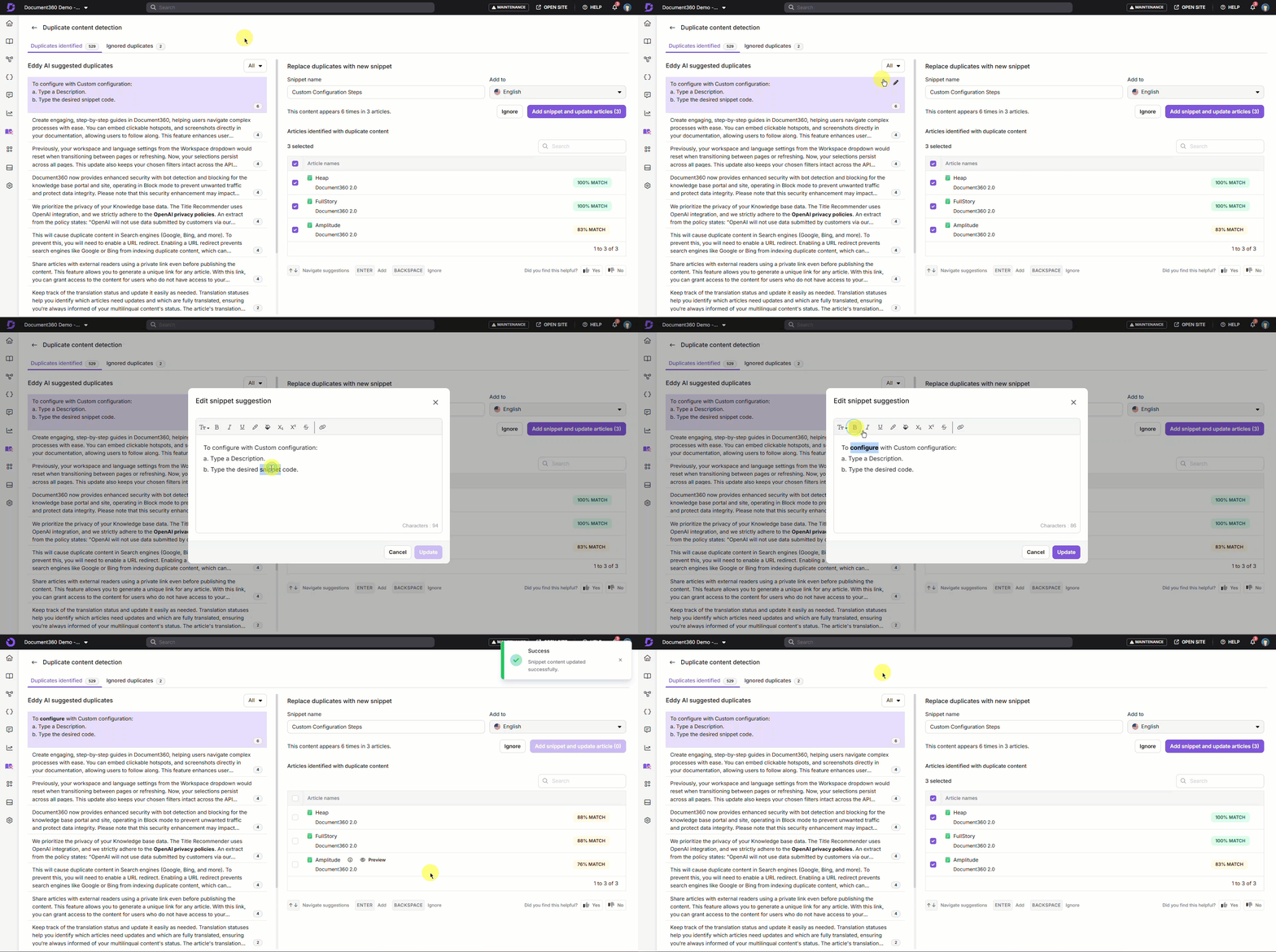
Once you’ve identified your duplicate content in your knowledge base, either manually or automatically, there are ways that you can fix your duplicate content so that your knowledge base is more search engine-friendly.
- Consolidate or Merge Similar Articles – those articles that have duplicate content can be merged into one single article, so that you end up with just one page for the content you need. Choose the page that you consider has the most authority and add any content that is missing to the main article that you want search engines to index.
- Apply Redirects or Canonical Logic – if you want to keep your duplicate pages for some reason, you can redirect to one page that you want to be indexed by SEO, or choose the canonical page, which is the one that you consider to be the preferred version. This means you can keep ranking signals that you have already earned, but search engines have only one page to display in the results.
- Rewrite or Expand Thin or Repetitive Content – you don’t have to remove pages at all if you consider it a good use of time to actually rewrite or expand the content on your duplicate pages so you end up with different versions. This means you keep every page, but search engines will no longer consider your pages duplicates, and you can rank for different terms.
- Use Noindex for Utility Pages – let’s say you have a duplicate page that you need for the structure of your website, but you don’t actually want outside visitors to find that page. In this case, you can use Noindex for a page that is important to your site, but you don’t necessarily want to rank in search results, and this will prevent your duplicate page from competing with the page that you do want to rank.
- Replace Repeated Text with Centralized Snippets – as we’ve mentioned, sometimes you do want your text to be repeated, such as important information about your company. Instead of copying and pasting your text, which quickly gets very messy, you can use centralized snippets to repeat content across your knowledge base. This also has the advantage of being easy to change if you want to update your repeated content at any point.
It’s up to you to decide how to approach your duplicate content and fix it, choosing a method based on the goals you have for that particular content and why you have included it in your knowledge base in the first place.
🎥 Check out How to Eliminate Duplicate Content in Your Knowledge Base with Document360
Conclusion
Knowledge bases that manage their duplicate content are in a much better position to show up in the search results. However, this time-consuming administrative task can often get put off to another day as more urgent priorities take precedence. That’s why Document360 offers a way to use Eddy AI to identify duplicate content and create snippets to replace it, eliminating the manual way of searching for duplicate content.
Manually searching for duplicate content in a large enterprise knowledge base can be like searching for a needle in a haystack. AI does all the hard work for you and finds the duplicate content so you can decide what you want to do with it, whether that’s consolidating articles or hiding them from search so you end up with a single main page that you want to rank for SEO.
Eddy AI instantly identifies duplicate content and helps you fix it, working directly within your knowledge base to save time and effort. Improve SEO quickly by identifying and fixing duplicate content and end up with a knowledge base that works as it should.



 –
–