EN
EN  PT-BR
PT-BR FR
FR ES
ES DE
DE

AI Summary
- AI-agent traffic to documentation sites is increasingly exceeding human-generated traffic. AI bot traffic grew 187% from January to December 2025, while human traffic grew 3.1%; agentic bots grew 7,851% year-over-year.
- Chatbots, AI assistants, MCP servers, and search-engine AI summaries increasingly deliver documentation information without browser navigation. These implementations usually pass textual information while skipping images.
- Image-heavy articles produce thin content chunks and reduce chatbot retrieval quality. Step-by-step guides should provide self-contained text with exact UI labels, paths, and expected outcomes.
- Stale screenshots can show false information, erode customer trust, and require substantial maintenance without improving chatbot or AI-assistant responses.
- Use consistent headings, numbered steps, tables, callouts, in-app tours, live embeds, auto-generated visuals, feedback signals, screenshot metadata, and an agent-readiness checklist. Test top articles by asking chatbots questions answered only in screenshots.
AI-generated content. It may contain errors.
See Document360 in action
It is common nowadays for traffic from AI agents to the docs site to exceed human-generated traffic. LLM crawlers, AI coding agents, and AI assistants across the web are accessing docs content to help their users accomplish a task or find the right information. The practice of humans reading an article from start to finish is becoming a minority case.
AI bot traffic grew 187% from January to December 2025, while human traffic grew just 3.1% over the same period, and a new category of agentic bots performing autonomous tasks grew 7,851% year-over-year.
Even though AI agents are the new customers of documentation sites, documentation articles are still being written for a human audience. Many documentation articles include screenshots so readers can visually verify what they see in their software UI. AI agents do not see any screenshots as they consume more text information via markdown files.
How AI Agents Consume Your Docs
Nowadays, customers ask chatbots directly without navigating to documentation articles. Chatbots provide accurate responses grounded in knowledge present in relevant knowledge base articles. AI assistants such as ChatGPT, Perplexity.ai, Claude, and Gemini write articles. MCP servers expose documentation directly to AI agents as tools, and there is no need for any AI agents to access documentation via a web browser anymore. Search engines such as Google provide AI summaries that help customers get answers quickly without clicking any links or buttons.
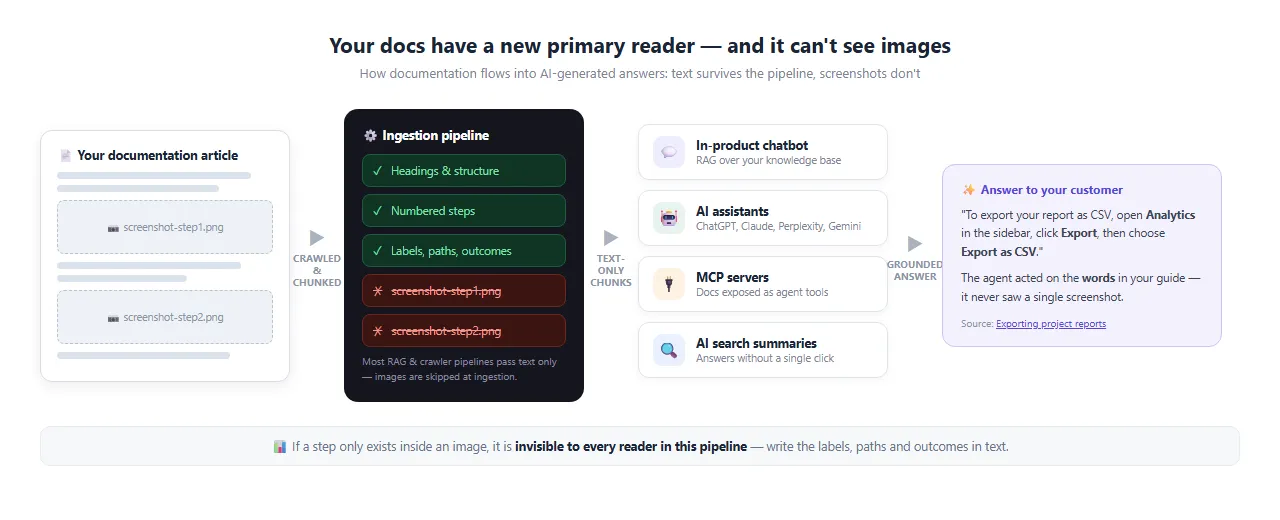
In many chatbots and AI assistants’ implementations, only textual information is passed, and images are usually skipped. If your knowledge base articles are image-heavy, they produce thin content chunks, which reduce the chatbot’s retrieval quality for answer generation. If there are many screenshots for a step-by-step procedure, the AI agent needs the textual information on how to do it rather than seeing the screenshots. If the steps are clearly written in text, AI agents can understand them and act on the UI elements of your software application.
Find out how Document360 helps you build docs AI agents can actually use.
Book a Demo
Screenshots as a Trust Liability for Humans
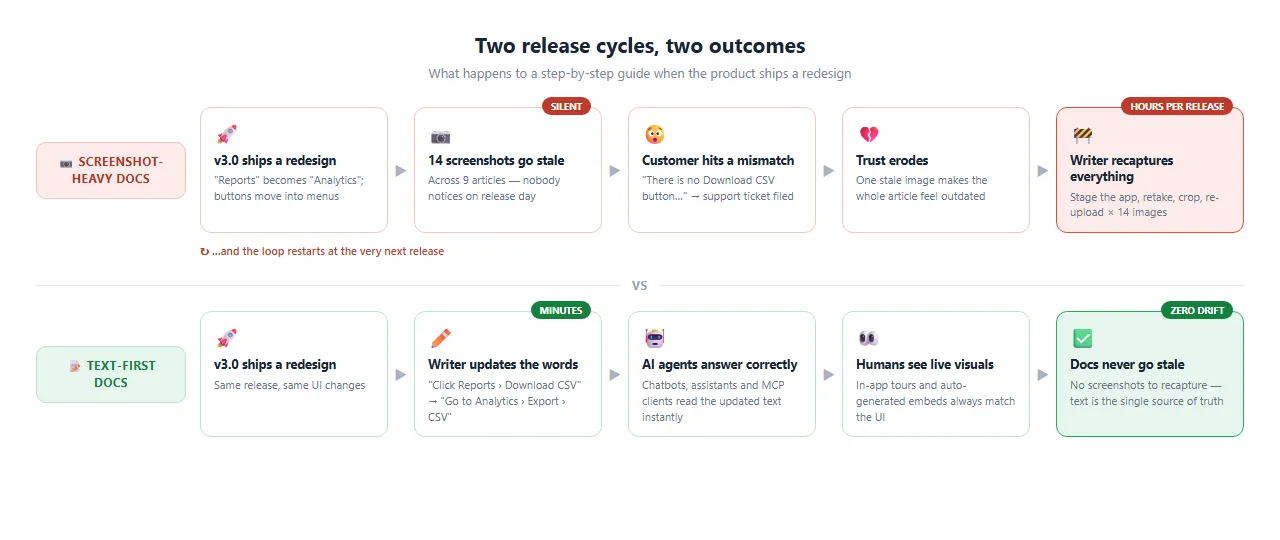
Given the pace of product velocity of modern software, screenshots go stale as soon as new features ship. A stale screenshot is worse than none because it shows some false information confidently to the customer on the documentation site. Once the customer finds a mismatch between a documentation article with stale screenshots and the software product, the customer might assume that the whole article is outdated. This erodes customer trust in the documentation articles. One stale screenshot taints the knowledge base.
Technical writers need more time to fix stale screenshots. If a specific feature with outdated screenshots is present across many articles, it takes even more time to fix it. It is hard to maintain the freshness of screenshots. Until a customer complains about stale screenshots, it is not given attention. Technical writers spend hours taking screenshots and updating relevant articles, but it does not help to improve the accuracy of a chatbot’s or AI assistant’s response. 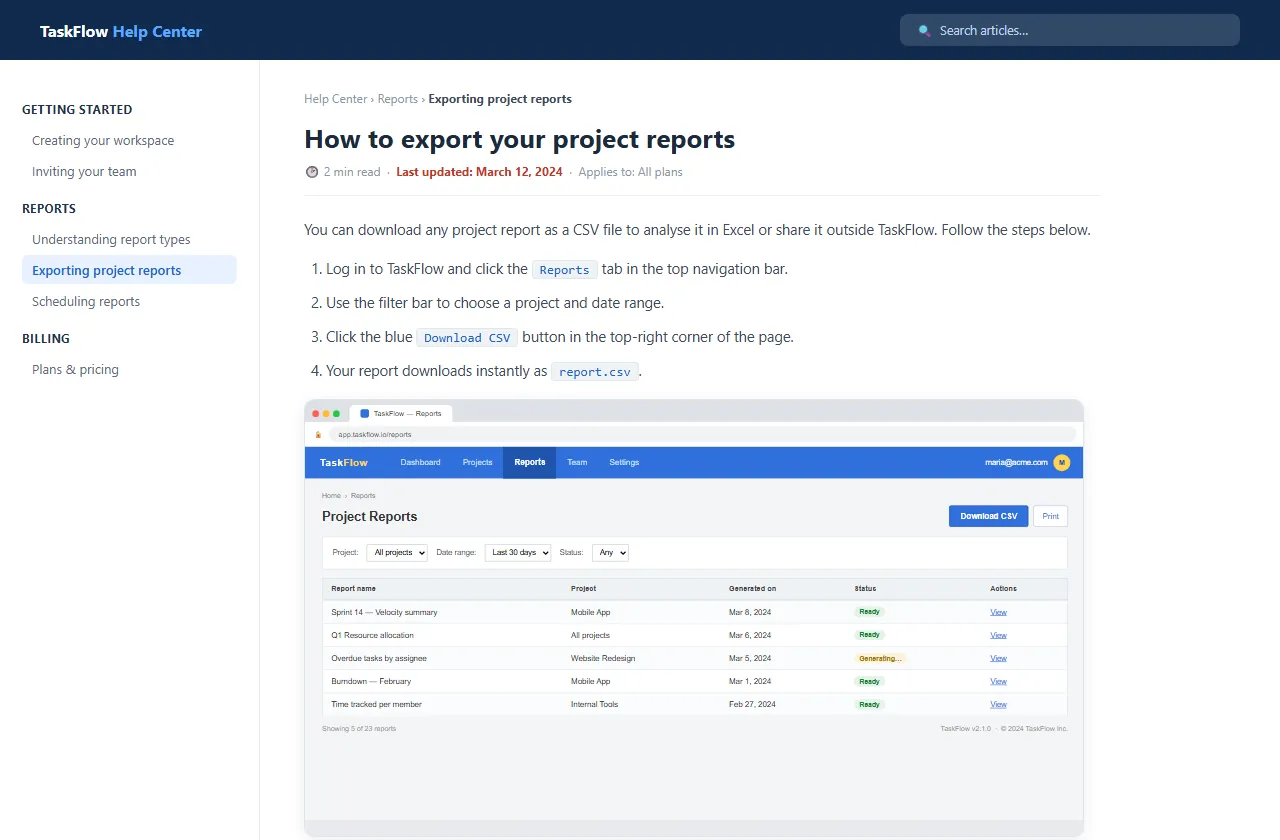
How to Make Documentation Readable Without Screenshots
Ensure all step-by-step guides include self-contained text explaining UI elements, including exact labels, paths, and expected outcomes. Having a good content structure helps AI agents to parse the content well, including consistent headings, numbered steps, tables, and callouts. Instead of having screenshots in the documentation article, have them inside in-app tours, live embeds, and auto-generated visuals. Use gap signals from customer feedback, support tickets, and zero-result searches to find where screenshot-dependence is causing failures. Also, adding metadata to screenshots would help technical writers review them periodically and update them as necessary.
For AI agents, create an agent-readiness checklist whereby AI agents can answer from the textual information alone, irrespective of screenshots. Screenshots are one blind spot, so see how AI-ready your docs are across every check an agent runs. Adding this to the product release checklist and documentation audit process helps to enforce the freshness of screenshots.
Run the Screenshot Test on Your Top Articles
Embedding screenshots to make it easier for human customers to understand has been part of technical writing practice. The primary audience of your documentation site has already shifted from humans to AI agents. Modern documentation sites contain minimal screenshots, and their content is fine-tuned for AI agents’ consumption. Technical writers should run screenshot tests on their top articles and ask their chatbot questions whose answers are hidden in images. If those queries are unanswered, the text content should be added to help AI agents get more information. It is vital to know that AI agents will never miss your screenshots, and your customers will never miss stale screenshots.