 EN
EN  PT-BR
PT-BR FR
FR ES
ES DE
DE


A new operator starts on the line. She picks up the printed instruction sheet clipped to the workstation, the one that has sat there since before a process change three months ago. She follows it exactly. Two shifts later, a quality defect surfaces, and the investigation traces it to a step that was revised during a machine reconfiguration but never made it onto the printed copy.
The operator did nothing wrong. The instructions did.
Work instructions that live in static files cannot keep pace with real operations, and the cost is measurable. Unplanned downtime drains roughly $1.4 trillion a year from the world’s 500 largest companies, about 11% of their revenue, according to Siemens’ True Cost of Downtime 2024 report. Human error accounts for close to 23% of those stoppages, and poor documentation is one of its quietest drivers.
Here is the shift worth making: moving from paper or PDF work instructions to a structured digital platform is not only an efficiency gain. It is a quality control decision.
📝 TL;DR
Choosing work instruction software is less about the feature list and more about whether your team will actually keep the instructions up to date.
- Static paper and PDF instructions fail on three fronts: version control, findability, and accountability. Each one creates quality risk.
- The features that matter most are structured organization, rich media support, controlled version workflows, role-based access, intent-based search, and usage analytics.
- Work instruction tools fall into three broad categories: shop-floor platforms, documentation and knowledge base platforms, and lightweight process runners. Fit depends on who writes the instructions and who uses them.
- The questions buyers skip during evaluation, like how long an update takes to publish, are the ones that decide whether the system works six months in.
- AI is changing authoring, translation, and search, but it cannot confirm that a documented step is physically correct. Human review stays mandatory.
What Is Work Instruction Software?
Work instruction software is a digital platform for creating, organizing, publishing, and maintaining the step-by-step guidance that tells a person exactly how to perform a specific task. Think of the difference between a recipe and the single instruction to fold the batter until smooth. The work instruction is the granular, do-this-now layer.
It helps to place it next to two related terms.
A standard operating procedure describes a process at a higher level: what gets done, by whom, and in what order across the entire workflow. Standard work instructions sit underneath, defining the single best-known method for one task. Work instruction software is the tool that makes those instructions easy to write, find, and keep up to date.
Good work instruction software handles both authoring and retrieval, because the people writing instructions and the people using them are rarely the same.
Where Work Instructions Break Down Without the Right Software
This is the problem framing. The failure modes below are specific, and each one shows up as a quality or compliance issue long before anyone calls it a documentation problem.
The version control problem
Paper and PDF work instructions have no version history. When a process changes, when a machine gets reconfigured, a safety protocol gets updated, or a tool gets replaced, someone updates the file, saves a new copy, and hopes it reaches the right people. It rarely does.
Operators follow the printed copy on the shelf. The shelf copy is three versions behind. Quality deviations follow.
This is where the efficiency and quality cases meet. A 2025 controlled study in Scientific Reports compared visual instructions against code-based instructions, which convey steps through written code rather than images, on an assembly task. Participants using the visual format finished in roughly 5.3 minutes, compared with about 8.4 minutes for the code-based group, and reported lower cognitive load on every measure. The noteworthy catch is that the code-based group produced more precise assembly. Format matters, and an outdated instruction erases the benefit of whichever format you chose.
The accessibility problem
Work instructions stored in a shared drive or binder are only useful if the person who needs them knows exactly where to look. In high-turnover environments, a new operator lacks the institutional memory to navigate a folder structure built by someone who left 2 years ago.
Digital work instruction software with structured search and category organization removes the navigation problem. The instruction should be findable in seconds, not after a five-minute hunt through nested folders.
Accessibility also extends beyond location. Operators may access instructions from tablets, mobile devices, shared workstations, or production terminals, often while wearing gloves or working under time constraints. Clear navigation, responsive design, and fast search become operational requirements rather than user experience enhancements.
The accountability gap
Without a digital platform, there is no record of which version an operator used, whether the instruction was opened before a task began, or when it was last reviewed. When a quality audit or an incident review happens, that absence becomes an immediate liability.
You cannot prove the current method was followed if you cannot show which method was current.
Key Features to Look for in Work Instruction Software
Treat the next six items as a lens, not a checklist. The question for each is not whether the platform has it, but what would break operationally if it did not.
Structured content organization
Work instructions need to be organized by process, product line, department, or task type, not dumped into a flat document library. The structure decides how fast an operator finds what they need. Look for category hierarchies that mirror how work is actually organized on the floor or in the team, not how a content manager thinks it should be. The same principle underpins any well-built knowledge base: findability is a function of structure, not search alone.
A consistent taxonomy also makes reporting and analytics more meaningful. When instructions follow standardized naming conventions, categories, and metadata, organizations can identify content gaps, duplicate instructions, and outdated documentation more easily as the library grows.
Rich media and visual support
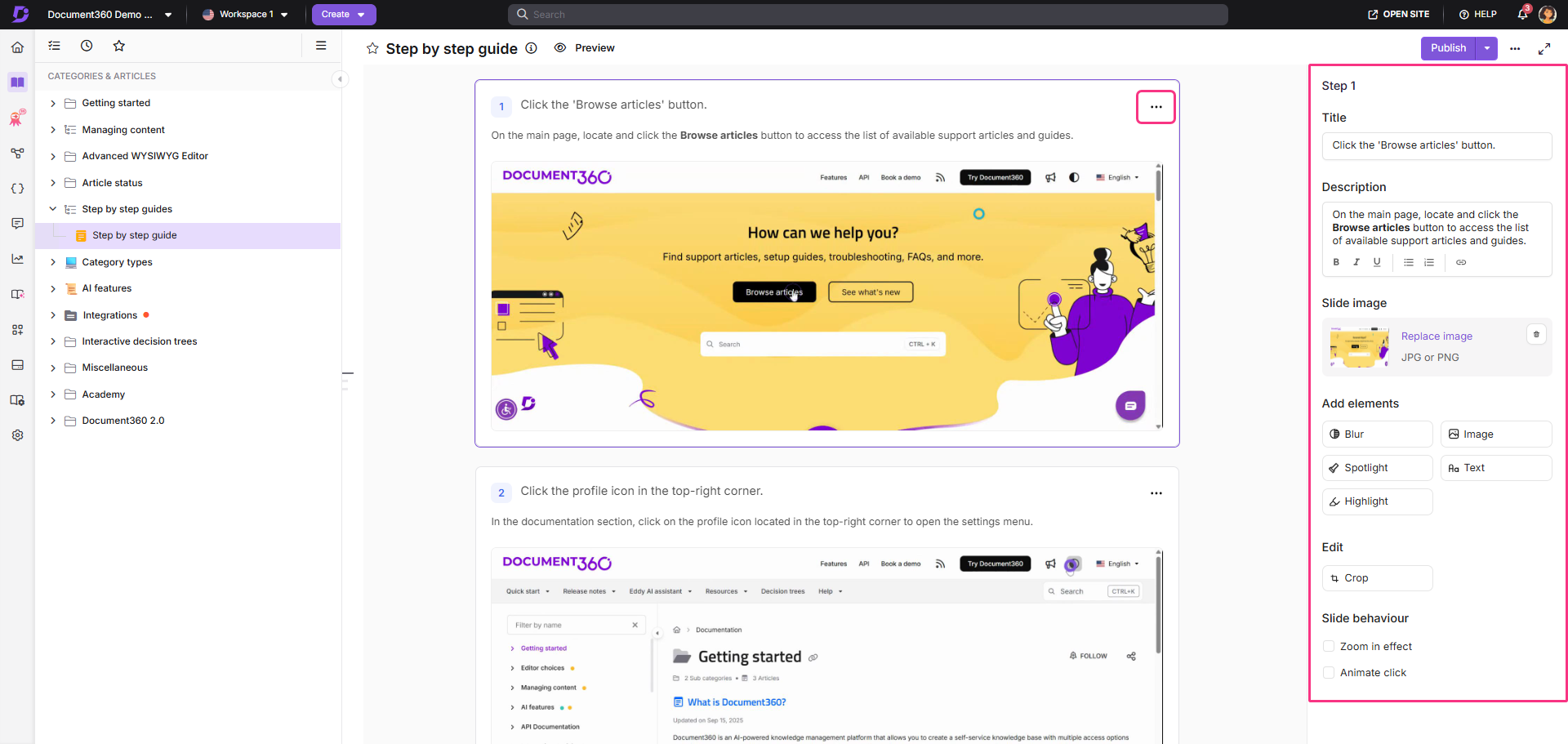
Text-only instructions fail operators on high-complexity or high-stakes tasks. The platform should support images, annotated screenshots, embedded video, and step-level callouts. The research is consistent on this point: visual instructions outperform text in terms of speed and cognitive load. If a platform accepts only plain text, it is a document repository, not a work instruction tool.
Version control with review workflows
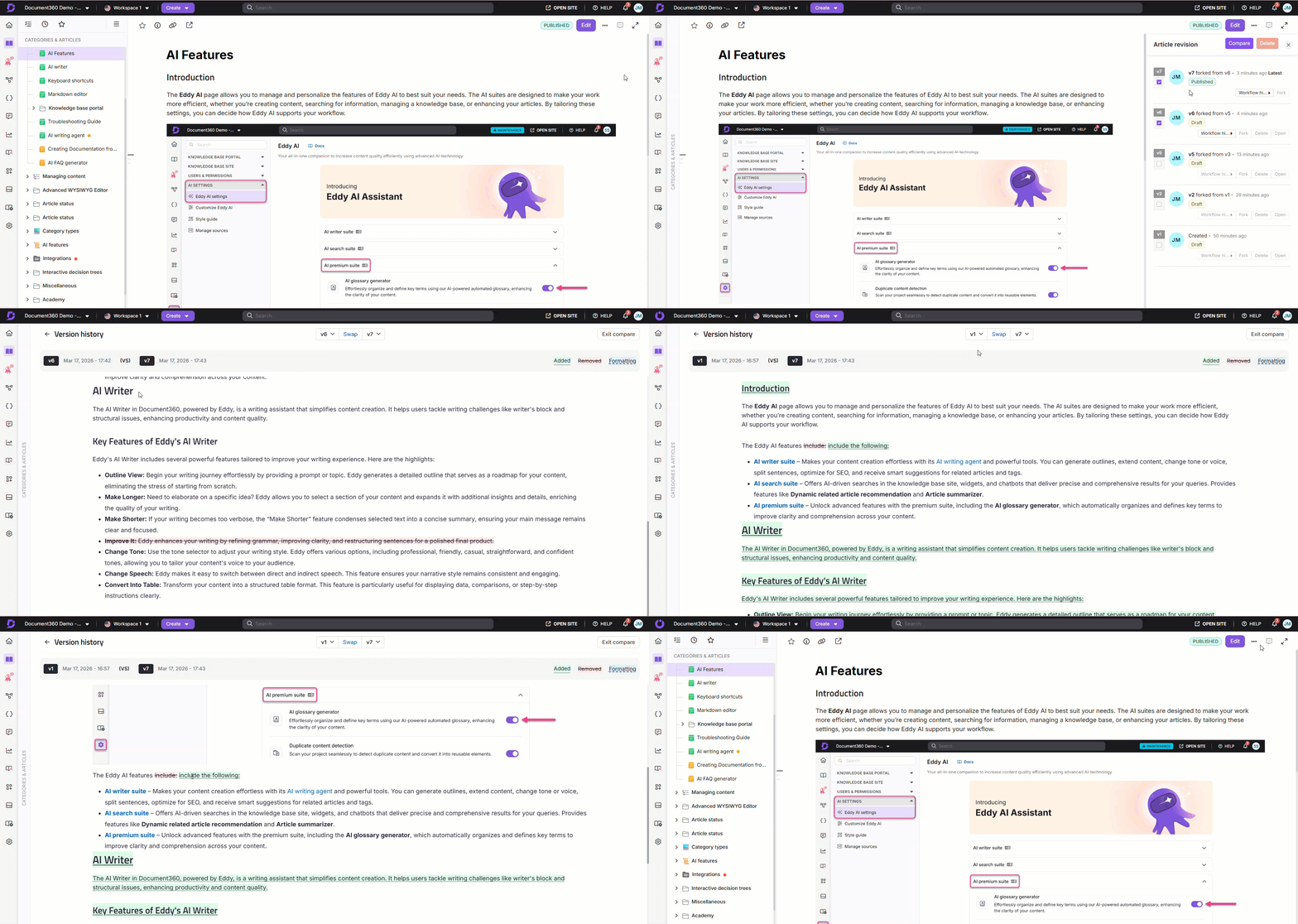
Every change to a work instruction should be tracked, reviewed, and published through a controlled process. Teams need to know who changed what, when, and why. Operators should only ever see the approved current version.
Draft, review, and published states are the baseline. Rollback to a previous version is essential for audits and incident investigations, because what the instruction said on the day of the defect is a question you will eventually be asked.
Access control by role and team

Not every operator needs to see every instruction. Not every team lead should be able to edit instructions outside their area. Role-based access at the category and article level keeps the library clean and prevents accidental edits to active documentation. It also reduces the cognitive load of wading through instructions that do not apply to your role.
Search that works for non-technical users
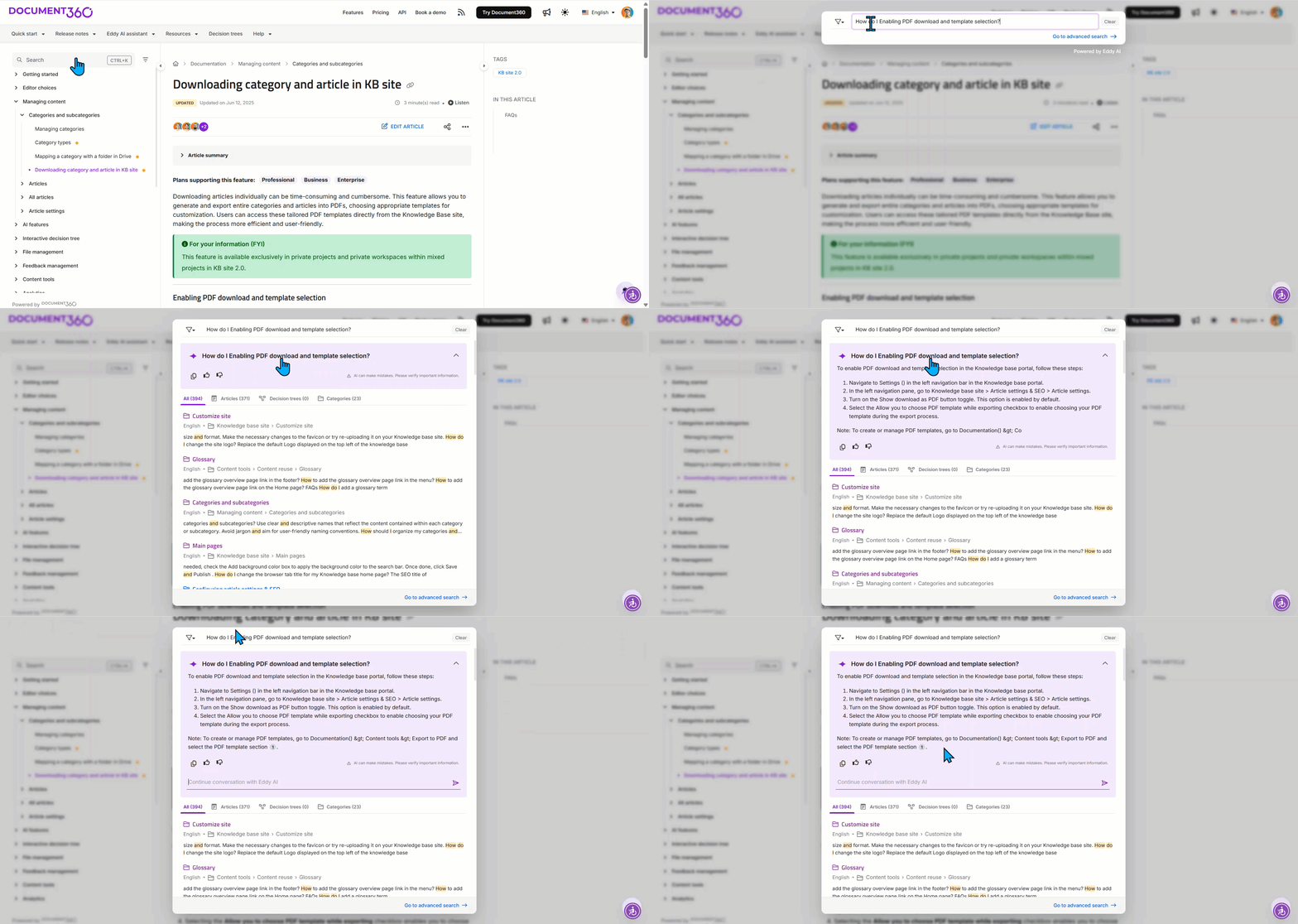
Operators do not search the documentation the way the people who wrote it do. A process engineer files an instruction under its formal name. An operator searches for the symptom, the part, or the plain-language problem. Search that understands intent, not just keyword matches, closes that gap. Any team where the authors and the users speak in different terms needs this, and most teams do.
Analytics on usage and gaps
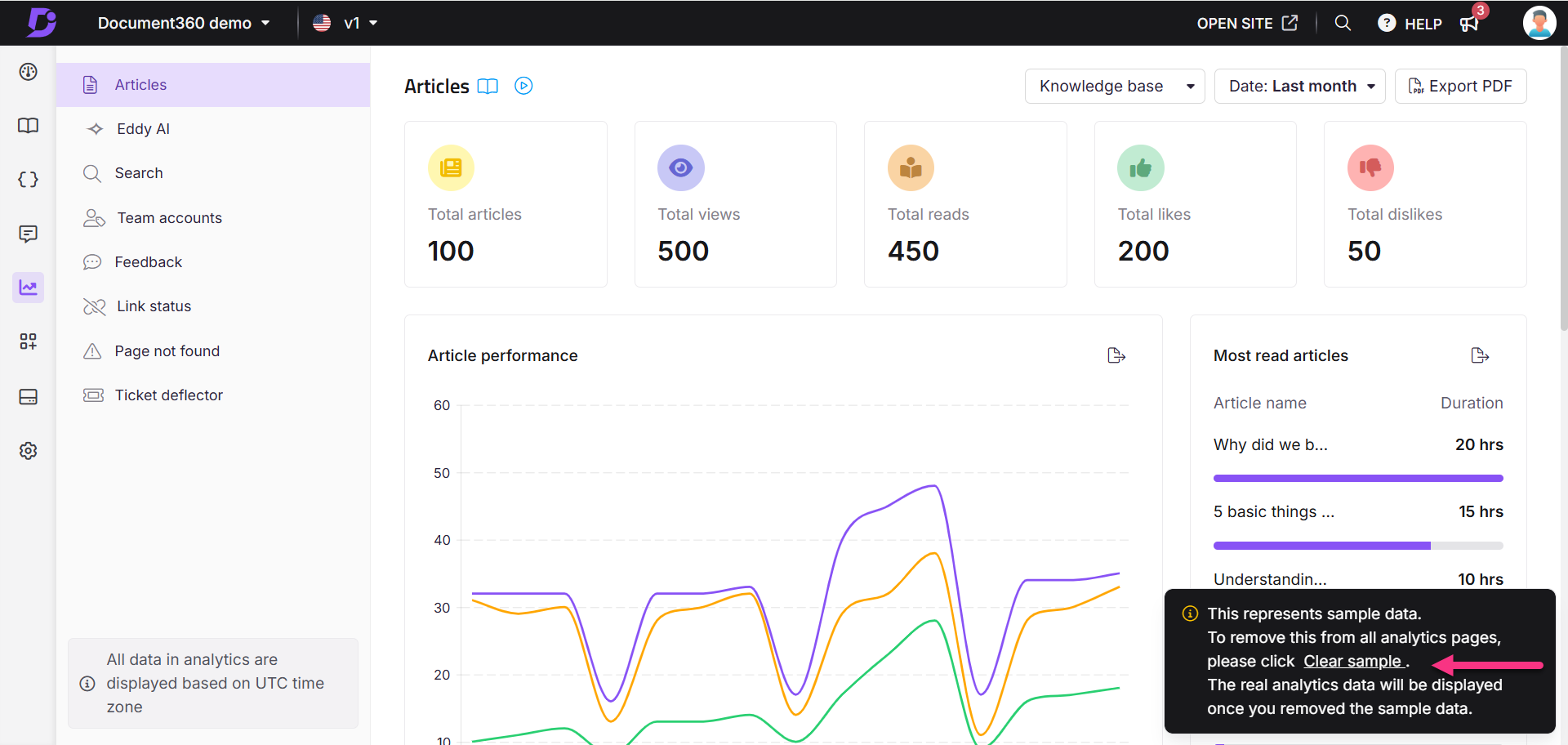
Which instructions get opened most? Which searches return nothing? Where do operators stall on a single step? Usage analytics tell you which instructions need updating, which tasks cause the most confusion, and which parts of the library nobody touches. Without analytics, improving your documentation is guesswork, and you will keep maintaining pages no one reads while the high-traffic ones go stale.
Create clear, version-controlled work instructions with Document360!
Book a Demo
Work Instruction Software at a Glance
Work instruction software spans a wide range. At one end sit manufacturing-specific platforms built for shop-floor operators, often with tablet-first interfaces, device integration, and connected-worker features. At the other end sit general documentation and knowledge base platforms that handle work instructions, among many other content types. In between are lightweight process and checklist runners built around the execution of recurring tasks. Where a tool fits depends on your industry, your team’s technical profile, and how much structure you actually need.
|
Category |
Representative tools |
Best for |
Watch-outs |
|
Shop-floor / connected-worker platforms |
Tulip, VKS, Dozuki, SwipeGuide, Azumuta, Parsable |
Manufacturing and assembly lines needing tablet-first, device-connected, operator-facing guidance |
Heavier setup and cost; often overbuilt for office or service teams |
|
Documentation and knowledge base platforms |
Confluence, Document360, GitBook, Notion |
Teams needing structured authoring, strong search, versioning, and instructions alongside wider documentation |
Not purpose-built for shop-floor hardware or offline-first floor use |
|
Process and checklist runners |
Process Street, SweetProcess, Scribe, Trainual |
Recurring administrative or operational workflows and fast step capture |
Limited depth for complex, media-heavy, or audited task instructions |
|
Field service and inspection apps |
SafetyCulture, Fluix |
Inspections, audits, and field tasks are performed on mobile |
Strong on forms and checks, lighter on rich authoring |
What to Ask Before You Commit to a Platform
These are the questions most buyers skip, the ones that surface limitations after the contract is signed.
Who creates the instructions, and who uses them?
The answer shapes everything, from editor experience to search behavior. If content is written by process engineers and used by operators on a shop floor, you need a capable authoring environment on one side and fast, simple retrieval on the other. Platforms that optimize heavily for one audience tend to frustrate the other.
How are instructions accessed at the point of task?
Are your people at a desk, on a tablet, on a factory floor with no Wi-Fi, or out in the field? The access method determines whether you need a mobile-first design, offline capability, QR code retrieval, or integration with your ERP or ITSM system. A platform that performs well in an office and fails on the floor is the wrong platform for the job.
What happens when a process changes?
This is the maintenance question, the one teams skip during evaluation and regret six months later. Ask how long it takes to update an instruction, route it for review, publish it, and make sure every team using it sees the new version.
If that workflow is slow or clumsy, instructions will not get updated. And an outdated instruction is worse than none, because people follow it.
Questions to Put Directly to a Vendor
Demos are designed to show strength. These questions are designed to surface the gaps a demo glosses over. Bring them to the call.
How does an operator find an instruction without knowing its title? Ask them to search the way a confused user would, live, during the demo.
Show me the full update path for a single step change, from edit to the moment every user sees it. Time it.
What happens to the old version after I publish a new one? Can I retrieve exactly what was live on a given date?
Who can edit, and who can only view? Show role-based control at the category level, not just the account level.
What do your usage analytics actually report, and can I see which searches returned no results?
What is your offline and mobile story, in detail, if my users are not at a desk?
How AI Is Changing Work Instruction Management
AI is reshaping three parts of the work instruction workflow and creating one risk worth naming.
Authoring is getting faster.
AI can draft a first-pass instruction from a transcript, a recorded screen capture, or a rough outline, which cuts the blank-page problem for subject-matter experts who know the task but dislike writing it up.
Translation is opening up.
Machine translation now produces usable multilingual instructions for distributed, multilingual teams, with a human reviewer checking the safety-critical wording.
Search is getting smarter.
Intent-based and conversational search lets an operator ask a question in plain language and get the right step, rather than guessing keywords. Search logs also surface gaps, the questions your documentation cannot answer yet.
Here is the risk. AI can generate a confident, well-formatted instruction that is wrong. It cannot stand at the workstation to confirm that step four is physically correct, that the torque value is correct, or that the safety warning is in the right place.
For anything that touches quality or safety, AI drafts the instruction, and a human still signs it off. That review step is not optional, and any vendor who implies otherwise is selling you a liability.
The Real Question Is Maintenance, Not Features
The gap between teams that execute consistently and teams that do not is rarely a talent gap. It is an information gap: the right instruction, in the right format, at the right moment, for the right person.
Work instruction software exists to close that gap, but software alone cannot do so. The platform you choose has to make instructions easier to maintain than to ignore, because the moment maintenance becomes a chore, your library starts drifting out of date, and you are back to the operator following the wrong sheet.
So the real question is not whether to digitize your work instructions. Which platform will your team actually keep current?



 –
–