 EN
EN  PT-BR
PT-BR FR
FR ES
ES DE
DE

There are over 25 core alternatives to Microsoft OneNote. However, the question is: do you still use OneNote in 2026, or are you looking for the best OneNote alternatives?
Documentation in 2025 is already driving product development, onboarding, customer support, internal wikis, compliance, team efficiency, and so many other processes. In 2026, documentation will become a core operational asset. Again, the question arises: is a note-taking tool enough, or does your team need a knowledge base tool that can document at scale?
According to a report by Forrester Consulting, 47% of businesses reported higher customer satisfaction from digital document processes. Knowledge base tools helped them strengthen data security and make signing and sharing information easier.
This article talks about why teams in 2026 are looking for alternatives to Microsoft OneNote, shares insights on the top OneNote alternatives, and helps you list down the correct knowledge base for your team dynamics.
📝 TL;DR
Teams are looking for OneNote alternatives in 2026
Forums continue to discuss OneNote alternatives due to Microsoft ending support
Find the correct fit knowledge base for your team
Best alternatives to OneNote
- Document360
- Evernote
- Coda
- Google Keep
- GoodNotes
- Obsidian
- Zoho Notebook
Why Are Teams Looking For OneNote Alternatives In 2026?
While OneNote is a solid note-taking app and still remains the go-to tool thanks to Microsoft integrations and its familiar interface, it is not suitable for dynamic teams that require real-time organization, integration, and collaboration.
It’s not that OneNote lacks any features; on the contrary, it has too many features that one has to navigate through. It also offers various formatting options; however, where it lacks is collaboration, backlinks, or even note publishing, and it is slow when it comes to finding the desired note.
Also, since Microsoft is phasing out its legacy note-taking app for Windows 10, teams across are now weighing whether a note-taking app is sufficient or they need a knowledge base tool that offers them structure, scale, and stability.
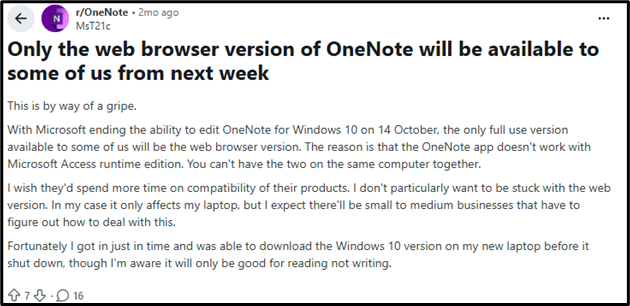
Reddit, Quora, Windows, And Other Forums Continue To Discuss OneNote Alternatives
With over 100 million users worldwide, OneNote has stood the test of time and remains a popular choice. However, users feel it works best for quick notes and basic organization. While no tool offers everything, see for yourself why the best OneNote alternatives remain a hot topic across forums.
- Some users report that the free version has limitations, syncing is slow, and so is the performance. (Source)
- It glitches and often deletes the work, and takes a lot of time to sync. (Source)
- According to some users, it is difficult to use and not a very organized system. (Source)
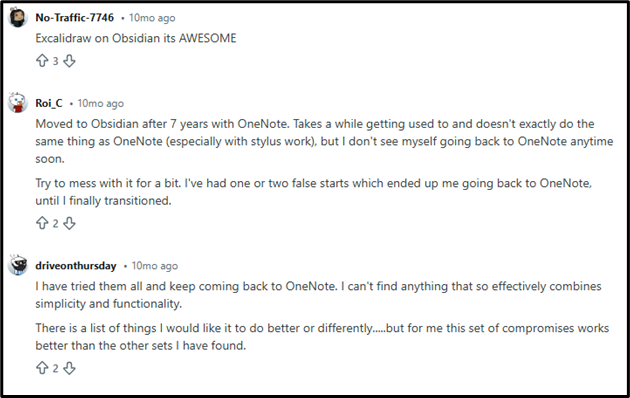
Do you also feel the same about OneNote? It’s time you take a look at knowledge base tools and switch to the best OneNote alternative.
Time To Find The Correct Fit Knowledge Base For Your Team
You are still here because of one of these three reasons:
- Your team is struggling with documentation
- You are looking for a tool that turns scattered notes into a scalable documentation system
- You are looking to future-proof how your organization manages knowledge in 2026 and beyond
And we are here to make that decision easier for you. Here is a list of features that you must look at when you start comparing OneNote to other tools.
- AI and intelligence capabilities
- Cross-platform switch and performance
- Seamless integrations with other tools
- Collaboration and team features
- Security and compliance
- Ease of use and adoption
- Price and scalability
Best Alternatives To OneNote
Now, without further ado, let’s get straight to what you are here for: the best Microsoft OneNote alternatives.
|
TOOL |
BEST FOR |
PLATFORM |
AI TOOLS |
INTEGRATION |
PRICING |
STANDOUT FEATURE |
CAPTERRA RATING (5) |
|
ONENOTE |
General Users |
Windows/ MacOS/iOS/Android/ Web |
No |
Yes |
Free+Paid |
Quick notes |
⭐ 4.6 |
|
DOCUMENT360 |
Teams |
Web |
Good |
Yes |
Paid |
Knowledge base, Team documentation |
⭐ 4.7 |
|
EVERNOTE |
General users |
Windows/ MacOS/iOS/Android/ Web |
Basic |
Yes |
Free+Paid |
Best web clipper |
⭐ 4.4 |
|
CODA |
Ops |
Web, Mobile |
Good |
Yes |
Free+Paid |
Team doc + Workflow |
⭐ 4.6 |
|
GOOGLE KEEP |
Students |
Web/ Android/ iOS/ WearOS/ Chrome extension |
No |
Yes |
Free |
Quick capture |
⭐ 4.7 |
|
GOODNOTES |
Students |
iOS/ Windows/ Android |
No |
Yes |
Paid |
Handwritten notes |
⭐ 4.5 |
|
OBSIDIAN |
Writers |
Win/Mac/ Linux/iOS/ Android |
Plugin |
Plugin |
Free+Paid |
Knowledge graph |
⭐ 4.8 |
|
ZOHO NOTEBOOK |
Students/ Teams |
Web, Mobile |
No |
Yes |
Free+Paid |
Team notes |
⭐ 4.5 |
1. Document360
Document360 is an AI-powered workspace that offers category-based documentation, making it the right fit for IT teams, SaaS companies, documentation managers, product organizations, and the like.
Documentation is simple, easy, and shareable with Document360. For teams looking beyond the limitations of Microsoft OneNote, Document360 stands out as the leading alternative, purpose‑built for structured, scalable knowledge management.
While OneNote is excellent for personal note‑taking, its biggest drawback is the lack of organization and version control for growing teams, making it difficult to maintain consistent, searchable documentation across departments. Document360 directly solves this challenge with a documentation‑first platform designed for clarity, collaboration, and long‑term knowledge growth.
It offers advanced editors, category management, article revision history, team access controls, multilingual support, reusable content, a lightning‑fast search experience, and many more. Unlike OneNote’s free‑form pages, Document360 provides a structured workspace where teams can create, publish, manage, and scale documentation with precision.
Its clean interface, intuitive authoring tools, and enterprise‑grade features make it ideal for SaaS companies, support teams, and product organizations that need reliable, centralized knowledge.
With features like AI Writing Agent, Glossary Management, and Duplicate Content Detector, Document360 ensures your knowledge base remains consistent and easy to maintain as your content grows. If OneNote feels limited for team-wide documentation, Document360 delivers the enterprise-grade, scalable, and user-friendly solution you’ve been missing.
Looking for a scalable alternative to OneNote? See how Document360 helps teams manage knowledge at scale.
Book A Demo
2. Evernote

Another popular solution with a straightforward interface, Evernote, is for individuals or teams that are looking to capture ideas, systemize information, and store documents on one platform. Structured with rich formatting options, strong search functionality, and available across platforms, Evernote is a strong OneNote alternative.
3. Coda
Documents, spreadsheets, databases, you’ve got it all at Coda. You don’t have to stick to simple notes here, as with Coda, you can build interactive docs. Combine texts, tables, spreadsheets, and add interactive elements; however, you might find it complex if your requirement is for simple text notes.
4. Google Keep

If you are looking for a documentation solution, Google Keep would not be a good alternative, as you will not find the advanced features that you get in OneNote. However, if you are looking for an uncomplicated, lightweight alternative to Microsoft OneNote, then Google Keep is yours to keep. Quick notes, reminders, and excellent integration in the Google environment make it easier to seamlessly link it to your Google Drive.
5. GoodNotes
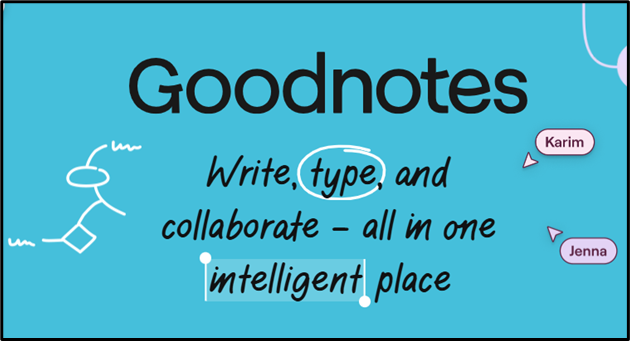
Goodnotes is a digital note-taking app that works best for individuals or teams who enjoy handwritten notes or sketching. Messy handwriting? No worries, the AI handwriting search makes it work. However, if you plan to write long notes or do heavy typing, you might find it a bit laborious.
6. Obsidian

Deep linking, customization, knowledge management, a large plugin ecosystem, and Obsidian are built on plain-text Markdown files. It offers a flexible offline-first approach, meaning you can access your notes without an internet connection, and it is often praised for it. It works well for research and writing projects, but not for quick scribbles or handwritten notes. Also, sync requires an add-on payment, and there is no handwriting support.
7. Zoho Notebook
With a notebook-based organizational structure like OneNote, this alternative comes with a straightforward interface offering a clean and intuitive design. Also, if your team works in the Zoho ecosystem, Zoho Notebook can be a good alternative. It offers cross-platform sync, diverse note types, and personal organization features. That said, Zoho Notebook is under the radar due to fewer integrations and limited text formatting and storage options.
Evaluating OneNote Alternatives
Each tool mentioned in this guide is evaluated based on a few criteria. How easy is it to write or create and organize notes, sync, search, and collaborate in real time, while considering pricing? And, most importantly, is it an alternative to Microsoft OneNote, and are you using it to take notes or manage knowledge?




 –
–