 EN
EN  PT-BR
PT-BR FR
FR ES
ES DE
DE


Given the proliferation of AI coding tools, every software product release adds new features, and these releases are happening on a daily basis at GenAI-native product companies. It is hard to keep track of high-velocity changes, and there is a high chance that a technical writer might miss some documentation. Sometimes, last-minute changes are made to the product feature, and technical writers are not informed about it. This leads to a documentation gap.
Some existing business applications log evidence of every documentation gap in real time. For example, customer support tickets, keyword search logs from a search engine, chatbot transcripts, and sales call notes. Each of these systems captures a customer who needed an answer but did not find it in the knowledge base. This blog provides information on 4 channels that help to identify knowledge gaps and how technical writers can turn signals into a published fix quickly.
Four Channels That Surface Missing Documentation
The four channels- customer support tickets, search logs, chatbot logs, and sales calls capture unmet needs of different segments of your customers. Customer support tickets show where paying customers get stuck, while search logs show how your self-service customers fail to find the right information. Chatbot conversation history captures the intent of the exact phrasing of unanswered questions. Some sales calls capture prospects’ intent to use documentation. These four channels give a full-funnel view into where the documentation falls short. Once data, content, and other signals from these four channels are wired up, we have a workable solution to quickly find and fix documentation gaps.
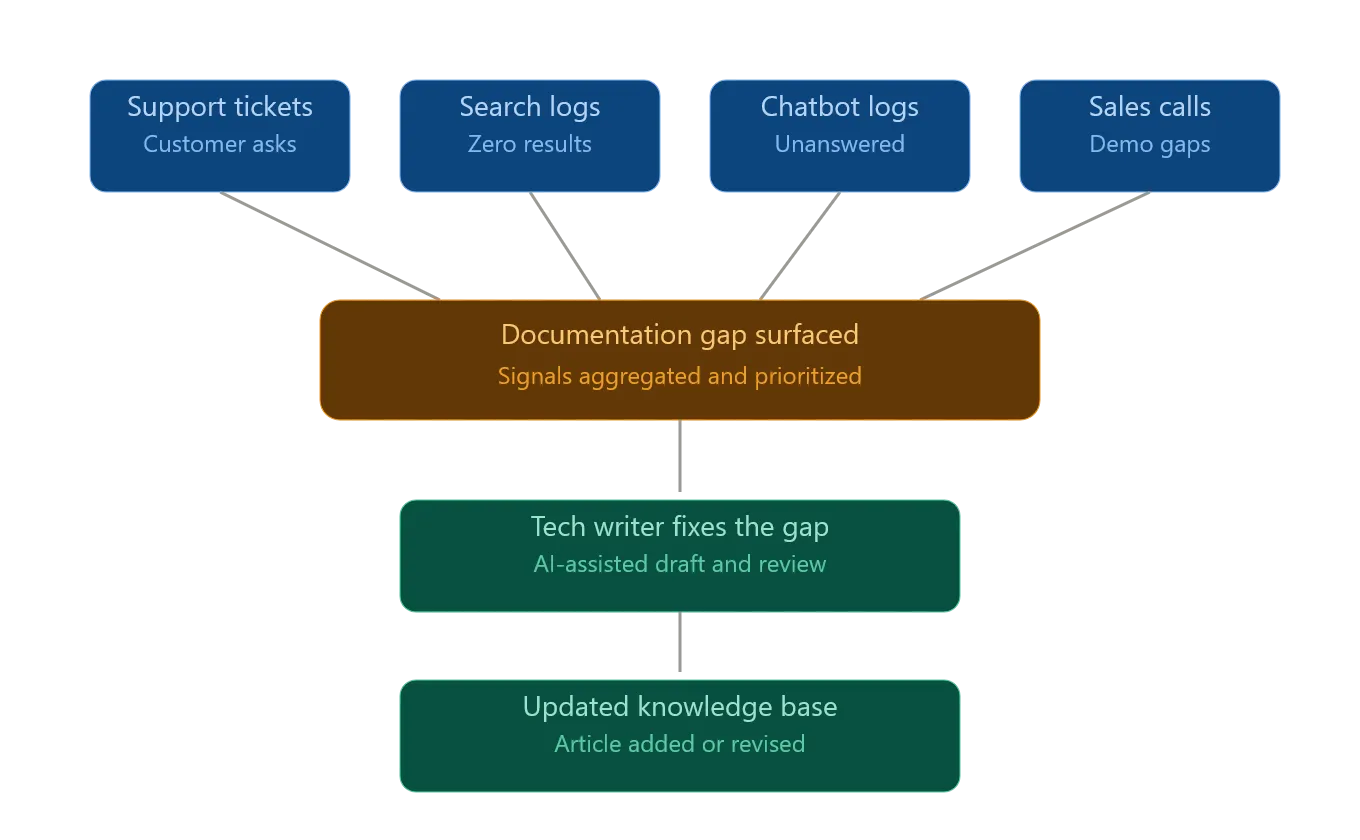
Figure: Flow of documentation signal from different channels
How Customer Support Tickets Expose Documentation Gaps
A customer support ticket is evidence that a customer could not find what they needed in the documentation. 35% of support tickets trace back to documentation problems; for every article that is missing or outdated, there is likely a customer already paying the price for it. Many times, customers find a tricky nuance in your product where no content about that scenario is documented. Customer support agents consult Subject Matter Experts (SME) for your product and try to resolve the ticket. After resolution, the solution for that customer problem resides inside the customer support business system. Many customer support platforms such as Freshdesk, Zendesk, and so on hold a plethora of product knowledge that might not have been transferred to technical documentation.
Support tickets also provide valuable context that is often missing from search logs. Unlike search queries, tickets typically include screenshots, reproduction steps, environment details, error messages, and the eventual resolution. This additional context helps technical writers understand not only what information was missing but also why customers struggled to complete a task successfully.
A useful practice is to distinguish between incident-driven tickets and knowledge-driven tickets. Incident-driven tickets are caused by product defects or outages, whereas knowledge-driven tickets arise because customers cannot find or understand existing documentation. Identifying this distinction helps teams focus documentation efforts on issues that can realistically be resolved through content improvements.
Over time, recurring ticket themes can be transformed into troubleshooting guides, configuration walkthroughs, implementation checklists, and frequently asked questions. These content assets not only reduce future ticket volume but also improve customer self-service success rates.
Customer support agents rarely inform if any new knowledge was created while troubleshooting an issue and share it with technical writers. In some organizations, a weekly/monthly cadence is set up to share information between the customer support team and the documentation team. GenAI toolkits allow clustering tickets by topics and flagging clusters that have no matching knowledge base article.
What Do Zero-Result Search Queries Tell You?
Traditional keyword search engines on a documentation site log every query, including the ones that return no results. These zero-result searches serve as a feedback signal to the technical writing team. The customer typed the exact “words” of what they needed help with, and the search results offered nothing.
Zero-result reports usually reveal two patterns. They are
- The first is content gaps where articles do not exist. For example, a query like “bulk export billing data” with zero results, repeated many times in a month, is a clear indicator to write that article
- The second is terminology gaps where the article exists, but the customer uses different vocabulary/business terms. Technical writers often add synonymous terms to an existing article such that the right article is found. Some knowledge base platforms offer rich terminology management capabilities, and the search engine can be customized to look for synonymous terms as well
How to Use Chatbot Logs to Identify Knowledge Base Gaps
Chatbots have become the norm in many knowledge base sites, and they are powered by RAG architecture. Every unanswered question is an opportunity to identify documentation gaps. Many times, chatbots fall back to a generic response or transfer to a human agent if the chatbot is unable to answer a question based on underlying knowledge base sources. Chatbot conversations capture exact intent, unlike search keyword logs. For example, questions like “How do I revoke an API key without breaking existing integrations?” tell you exactly what the content is missing in an existing article. If unanswered conversations are clustered by topic, then it is easy for technical writers to assess whether an existing article needs a content update or a new article needs to be created.
Chatbot conversations offer a unique advantage over traditional search analytics by capturing complete questions rather than isolated keywords. This allows technical writers to understand the customer’s underlying goal, context, and desired outcome. A question such as “How do I migrate users from one workspace to another without losing permissions?” provides significantly more insight than a search query containing only the words “workspace migration.”
Technical writers should also analyze conversations that receive partial answers. In many cases, the chatbot retrieves an article that is related to the user’s question but does not fully address the specific scenario being discussed. These interactions often indicate opportunities to expand existing documentation rather than create entirely new content.
Using Sales Feedback to Identify Documentation Gaps
Sales channel feedback for the technical documentation team is often underrated. During sales demo calls, a sales engineer might try to access a specific knowledge base article to better configure the product to meet customer requirements. If a sales engineer cannot locate the right articles, prospects often lose confidence in the product and might churn. Sales engineers might use Teams/Slack to communicate with the technical documentation team to fix content, but this often happens rarely due to collaborative structures and internal bureaucracy. If technical writers are allowed to listen to discovery and demo calls, they can empathize with prospects and identify the right documentation gaps to fix.
Identify, Prioritize, and Fix Documentation Gaps With Document360!
Book a Demo
How to Identify Documentation Gaps Using MCP
An MCP server acts as a bridge between an AI agent and the business systems that hold gap signals. Instead of a technical writer manually logging into Freshdesk, pulling a search report, reviewing chatbot transcripts, and checking CRM notes, an MCP-enabled AI agent connects to all four systems and surfaces actionable gap signals in a single workflow.
The AI agent does not replace the technical writer’s judgment; it handles the signal aggregation and pattern recognition so the technical writer can focus on writing and validation.
MCP-Enabled Gap Detection Workflow
Business Systems → MCP Servers → AI Agent → Gap Report → Technical Writer
|
Step |
Action |
Tool / System |
|
Connect channels |
MCP servers connect to support, search, chatbot, and CRM systems |
Freshdesk MCP, Analytics MCP, CRM MCP |
|
Aggregate signals |
AI agent pulls ticket clusters, zero-result queries, chatbot fallbacks, and sales notes |
Claude/AI agent |
|
Identify patterns |
Agent clusters signals by topic and maps them against existing knowledge base articles |
Knowledge base MCP |
|
Flag gaps |
Agent flags topics with no matching article or with articles that partially address the query |
AI agent output |
|
Draft fix |
Agent drafts a content outline or full article update for each flagged gap |
Claude/AI agent |
|
Validate and publish |
Technical writer reviews the draft, validates accuracy, and publishes |
Knowledge base platform |
Connecting Each Channel via MCP
Customer Support Tickets via MCP
An MCP server connected to platforms such as Freshdesk or Zendesk allows an AI agent to read and cluster open and resolved tickets by topic in real time. The agent identifies clusters where no corresponding knowledge base article exists and flags them as content gaps. This eliminates the need for weekly manual ticket reviews between the support and documentation teams.
Zero-Result Search Queries via MCP
An MCP server connected to the knowledge base platform’s search analytics feed enables the AI agent to continuously monitor zero-result queries. Rather than waiting for a monthly report, the agent flags queries crossing a defined volume threshold, for example, 50 or more occurrences in a seven-day window, and adds them to the gap queue automatically.
Chatbot Transcripts via MCP
An MCP server connected to the chatbot platform provides the AI agent with full conversation transcripts, not just fallback counts. The agent identifies conversations where the chatbot transferred to a human agent or returned a generic response, extracts the original question, and maps it against the knowledge base to determine whether the gap requires a new article or an update to an existing one.
Sales Call Notes via MCP
An MCP server connected to a CRM, such as HubSpot or Salesforce, allows the AI agent to scan call notes and deal records for documentation-related friction signals. When a sales engineer flags a missing article in a call note, or when a deal stage repeatedly stalls at the evaluation phase, the agent surfaces those signals to the documentation team without requiring a manual handoff via Slack or email.
What the Gap Report Looks Like
Once the AI agent has aggregated and analyzed signals across all four channels, it produces a structured gap report that the technical writer can act on directly. A well-structured MCP-generated gap report includes the following: The Technical Writer’s Role in an MCP Workflow
MCP shifts the technical writer’s role from signal hunter to content validator. The time previously spent manually monitoring four channels is redirected toward reviewing AI-drafted content, ensuring accuracy against the actual product, and applying brand voice and style guide standards before publishing. This is a meaningful shift, not because the technical writer does less, but because the work they do is higher value.
The human-in-the-loop step is non-negotiable. AI agents working from support tickets and chatbot transcripts can identify what is missing and draft a plausible answer, but they cannot verify whether the draft reflects the product’s current state. That validation step belongs to the technical writer, and it is where documentation quality is ultimately determined.
|
Field |
Description |
|
Gap ID |
Unique identifier for tracking |
|
Gap Description |
Plain-language summary of what is missing |
|
Source Channel(s) |
Which channels flagged this gap |
|
Signal Volume |
Number of tickets, queries, or transcripts referencing this gap |
|
Matched Article |
Existing article title if partial coverage exists, or “None.” |
|
Suggested Action |
Create new article/Update existing article |
|
Priority |
P1/ P2/P3 based on channel overlap and signal volume |
Turning Gaps into Published Articles
Identifying knowledge gaps is half the work. The other half closes them before the signal weakens. Using a modern GenAI toolkit helps technical writers fix the content gaps faster than ever before. An MCP server tool connected to channels such as customer support, knowledge base platforms, and customer feedback systems can be orchestrated by AI to identify knowledge gaps and draft content quickly. Technical writers then validate the fix for the identified documentation gap and publish the articles. Time-to-fix documentation gaps can be a useful metric for showcasing the business value of the technical documentation team in addressing documentation gaps.



 –
–